

|
Community & Enterprise
Easy Law FirmLaw firm management, legal case management and land records — with built-in OCR for scanned deeds.Run matters, hearings, clients and billing in one place, and turn scanned land documents into searchable, structured records. Everything runs on your own server: no IAP credits, no third-party OCR service. |
Built for
Lawyers & Advocates Land & Title Practices Clerks & Paralegals Practice Managers
Record rules keep a fee earner's caseload their own.
|
|
13 Areas
Practice areas with 73 ready-made matter types
|
OCR
Read scanned deeds, export to Word
|
Checklists
Every matter type knows what papers it needs
|
6 Languages
Bengali, Arabic, French, German, Spanish, Chinese
|
Why This Module
A law firm's work lives in files, court dates, land records and paper. Spreadsheets track the diary, a cabinet holds the deeds, and the limitation date lives in somebody's head.
Easy Law Firm puts the matter, the parties, the diary, the land parcel, the chain of title, the scanned deed and the fee note on one record — and watches the deadlines for you.
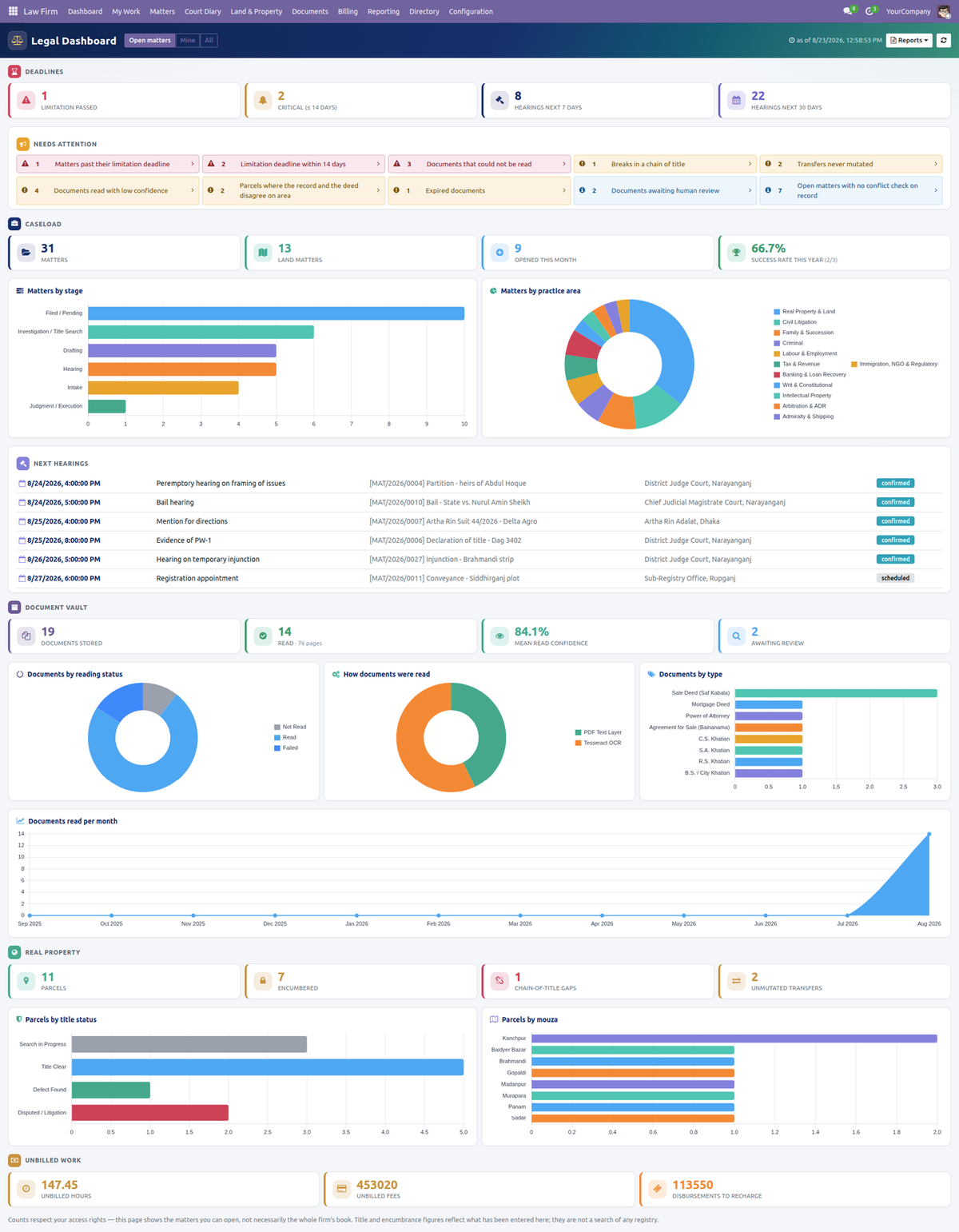
The dashboard leads with deadlines, then the problems worth your morning. Every tile opens the records it counted.
Matters & CasesClient, matter type, practice area, responsible lawyer, team, court, opposing party, stage and value — on a kanban pipeline with full chatter and activity tracking. |
Court Diary & LimitationCause list grouped by court, hearings with reminders and adjournment chains, plus a limitation watchdog that counts down to the day a claim becomes time-barred. |
Matter ChecklistsEach matter type carries the papers and steps it needs. Opening a matter builds the checklist; outstanding mandatory items are shown, never silently ignored. |
Land & Property RegistryParcels with mouza, JL no., khatian and dag, area in configurable local units, boundaries and geolocation — plus chain of title with gap detection and encumbrance tracking. |
Document Vault with OCRReads a born-digital PDF's own text layer first, falls back to Tesseract on real scans, reports a genuine per-word confidence, and exports a Word transcript. |
Time & BillingBillable time and disbursements per matter, invoiced through standard Odoo Accounting. Every entry is linked to the invoice line that billed it, so nothing bills twice. |
Thirteen Practice Areas, Ready to Use
Each area ships with its own matter types, usual forum and limitation defaults. Deactivate the areas you do not practise in and the clutter goes away for everyone.
| Real Property & Land | Civil Litigation | Criminal | Writ & Constitutional |
| Family & Succession | Corporate & Commercial | Banking & Loan Recovery | Labour & Employment |
| Tax & Revenue | Intellectual Property | Arbitration & ADR | Admiralty & Shipping |
| Immigration, NGO & Regulatory | |||
How It Works, Step by Step
The same order the included user manual follows: set it up once, open a matter, then get your land documents read, checked and billed.
|
1
|
Set it up onceUnder Configuration ▸ Settings, choose the default OCR language, resolution, page mode and the service product billed time is charged against. The Engine Status panel tells you exactly what the server can do right now — which OCR binaries are present and which language packs are installed — so you never have to guess. Then add your courts and sub-registry offices, review the document types, and check the land area units against your district's practice. |
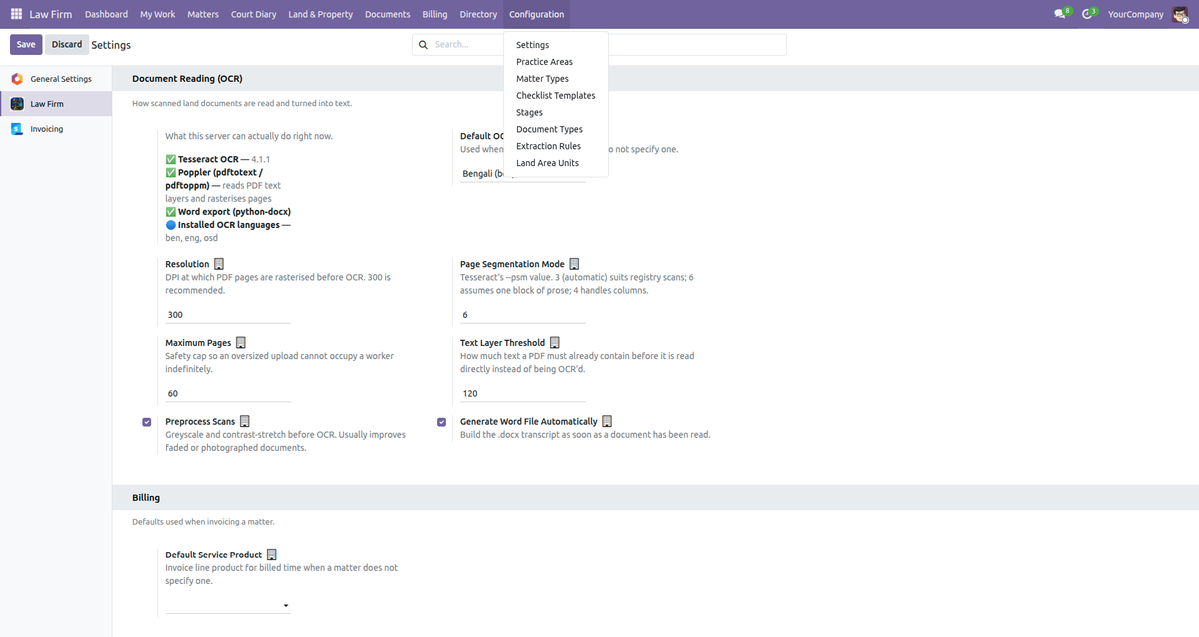
Engine Status reports what is installed before you rely on it — no silent failures.
|
2
|
Open a matterName the file the way you label it on paper, pick the client and the responsible lawyer, then choose the Matter Type. That one choice sets the practice area, pre-fills the limitation deadline, narrows the court list to the usual forum, and builds the checklist. Record the court and case number, the cause of action date, the billing mode and the brief. The reference code is generated for you. |
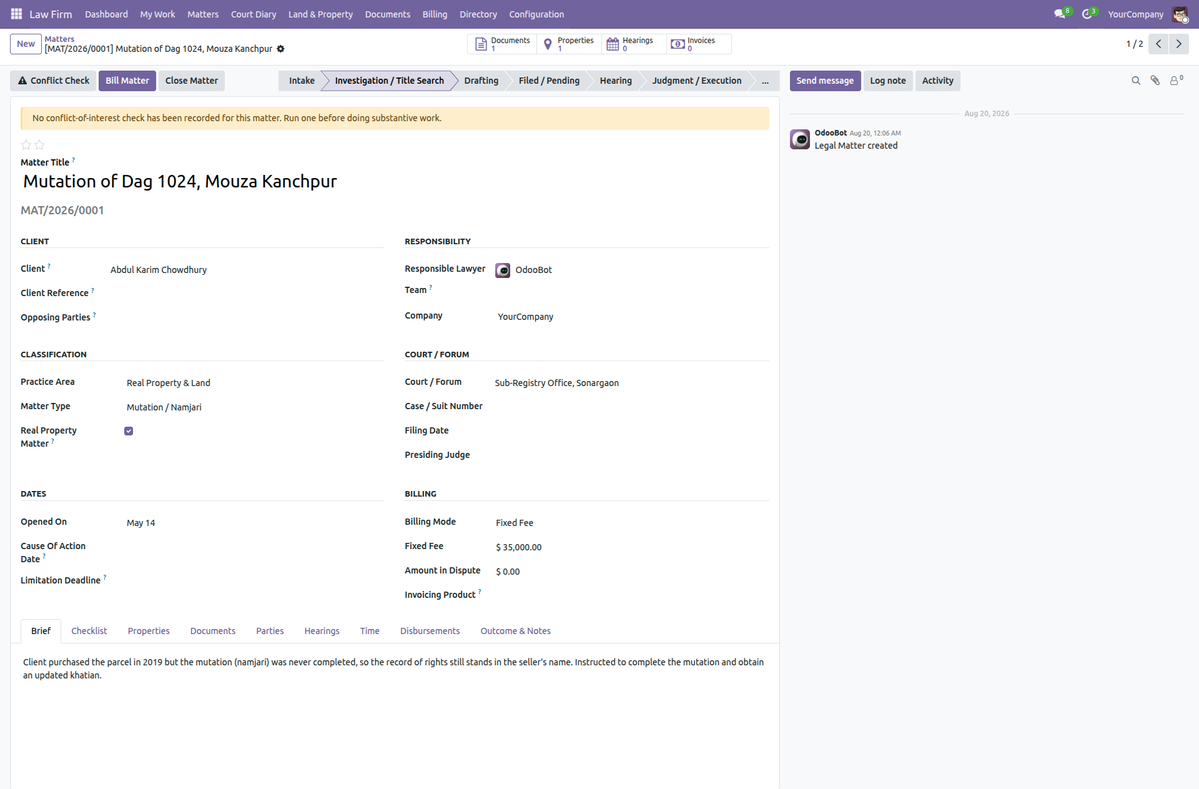
The matter record, with the stage pipeline across the top and a banner where no conflict check has been run yet.
|
3
|
Run a conflict check before you accept instructionsEnter every name involved — the prospective client, each opposing party, any company they control. The search runs across matters, parties, properties and, if you tick it, the full text of every land document you have read. The wizard reports “nothing found”, never “no conflict”. It tells you what it saw; clearing a conflict is a professional judgement that stays with you. |
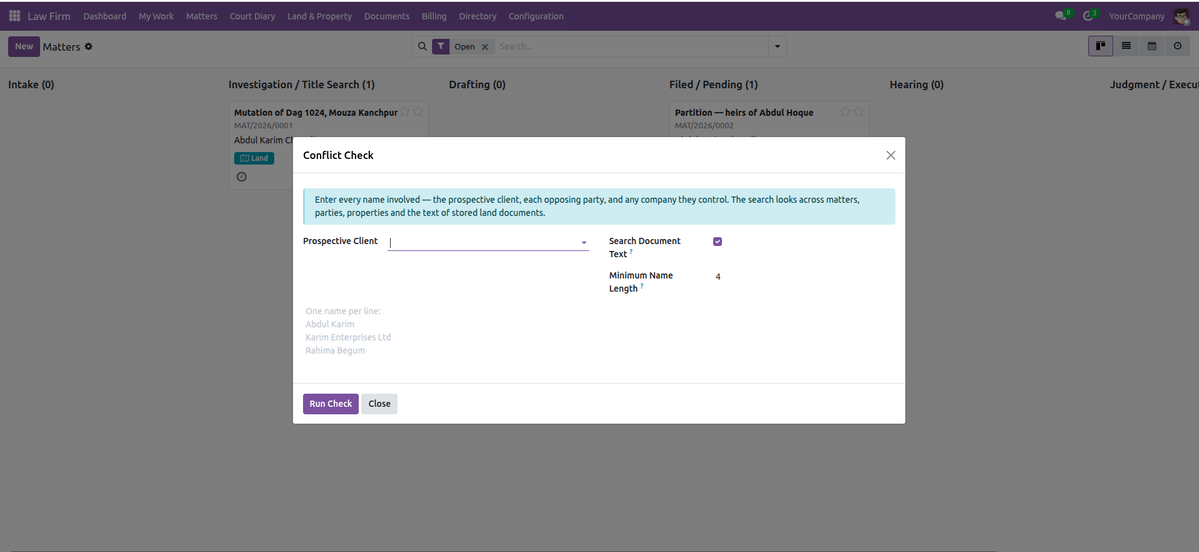
|
4
|
Work the pipeline and the diaryDrag a matter between stages as the file progresses. My Work shows what is yours — matters, hearings, outstanding items, time. Court Diary answers the other question: who must be in which court tomorrow morning. Hearings can be confirmed, marked held, or adjourned — and an adjournment creates the follow-up hearing and links the two. |
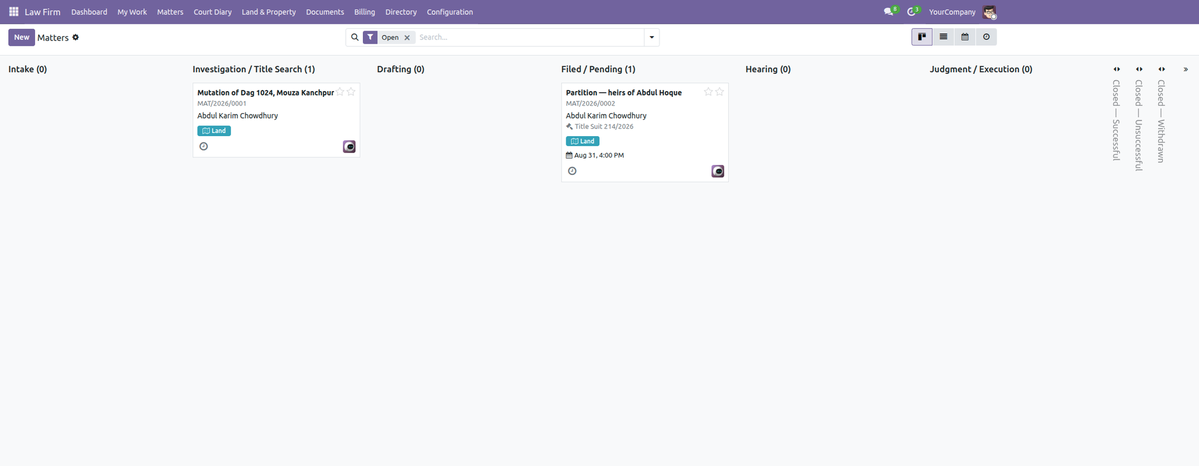
The matter pipeline. |
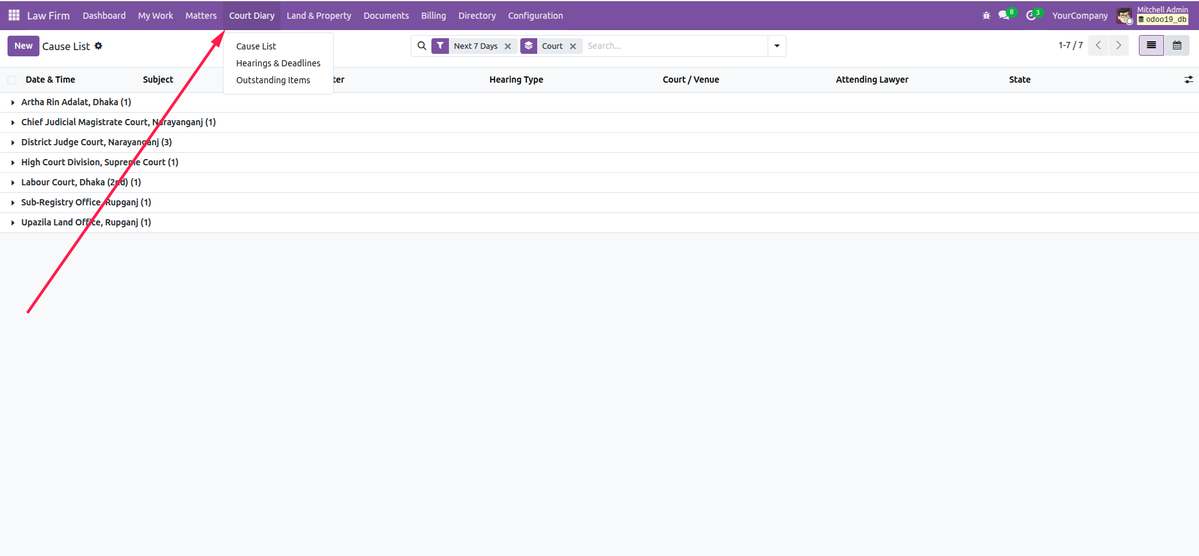
The cause list, next seven days, grouped by court. |
|
5
|
Record the land, then build the chain of titleA parcel carries what identifies it in the record of rights: mouza and JL no., survey type and khatian, dag or plot, map sheet, area in your own local unit, boundaries on all four sides, and the sub-registry office. The chain of title records who held the land and how it passed on. The module flags gaps where a predecessor does not match the previous owner, unmutated transfers that were never recorded, and area discrepancies where the deed and the measurement disagree. |
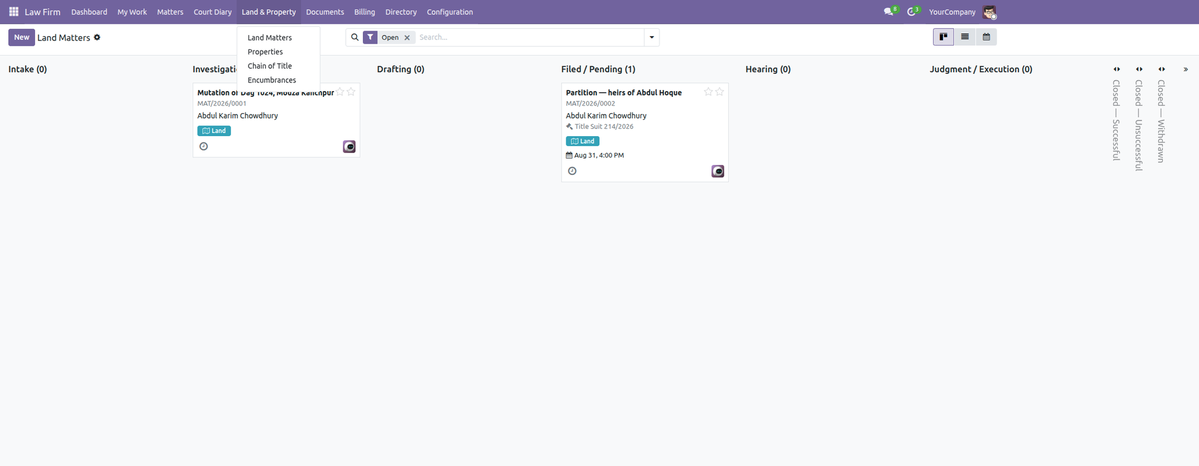
Land matters, parcels, chain of title and encumbrances, kept together.
|
6
|
Read a land document — the heart of the moduleUpload a scanned PDF or image, set the custody status (original, certified copy, photocopy, scan only) and where the paper physically sits, then press Read Document. The module reads a born-digital PDF's own text layer first — instant, lossless, nothing guessed. Only when there is no text layer does it rasterise the pages and run Tesseract, reporting a real per-word confidence and a plain-language quality band. Then user-editable rules pull out deed number, registration date, mouza, khatian, dag, area, parties and consideration. No extraction logic is hardcoded. |
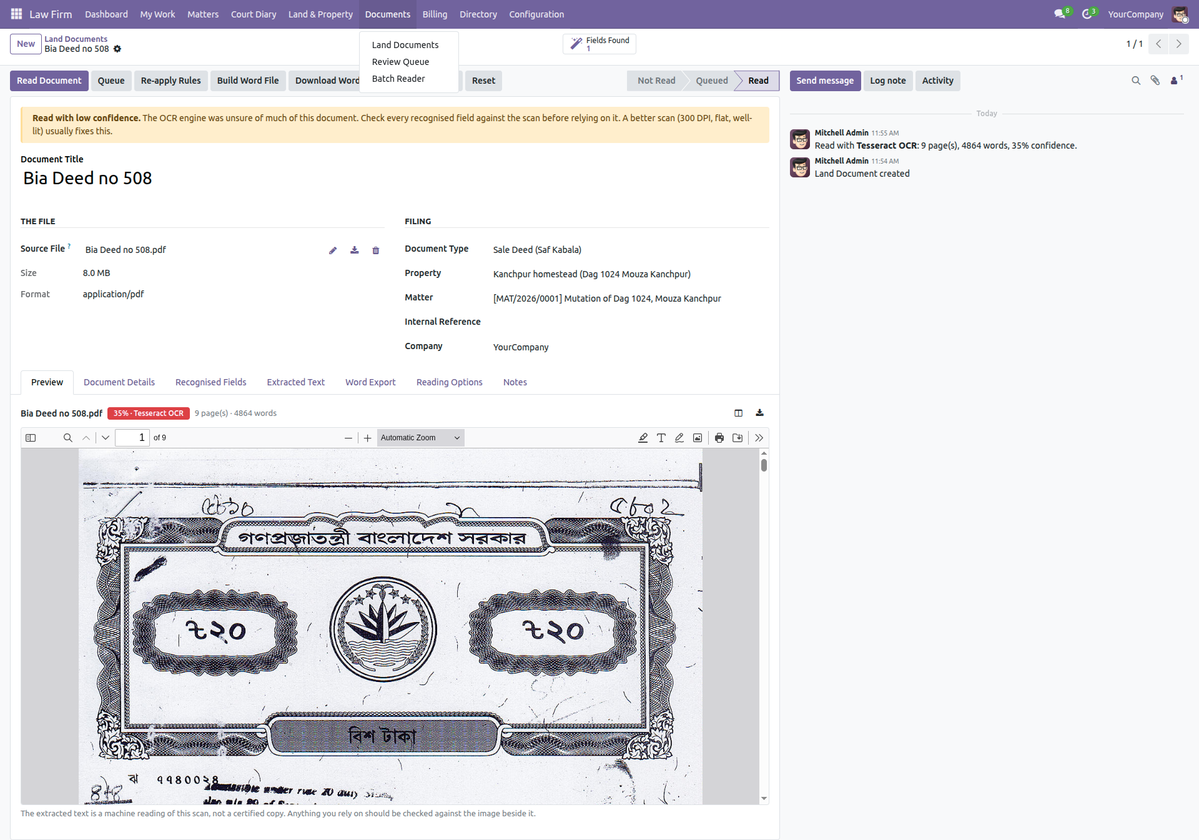
The scan on the left, the reading on the right — with the confidence stated plainly, including when it is low.
|
Side-by-side preview
Scan and extracted text together, with search, highlighting and clickable recognised values.
|
Word export
A .docx transcript in a monospaced font, so a khatian's columns survive, with a provenance header.
|
Batch reading
Drop in a stack of scans, file them against a matter or property, and queue them for the background reader.
|
|
7
|
A person checks it, then you bill itA machine read it; a human still signs it off. Verification is deliberately separate from reading: Not Reviewed, Reviewed & Accepted, Questioned or Rejected. The Review Queue lists everything still waiting. Record billable time and disbursements against the matter, then press Bill Matter — choose how much detail the client sees, and the invoice is created in draft, always. |
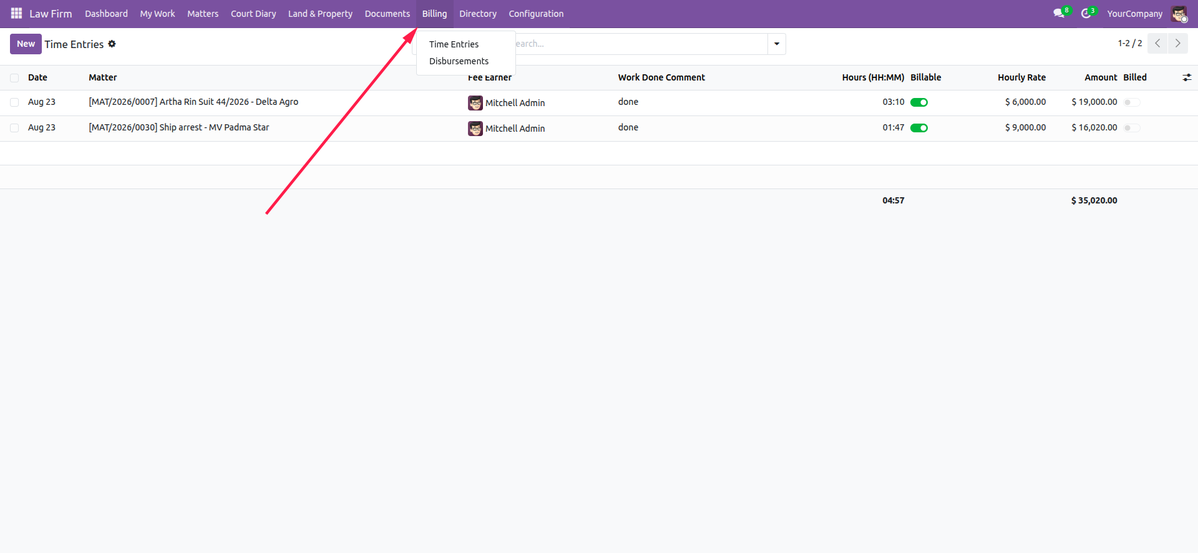
Time entries feed the fee note; each is linked to the invoice line that billed it.
|
8
|
Report on the practiceLaw Firm ▸ Reporting opens live pivot and graph analysis on the matters, hearings, time, disbursements, properties and documents you already hold — every cell drills down to the exact records behind it, and Printed Reports opens the source list for the Matter File, Property Dossier and Document Register. The Dashboard carries the same reports one click away: caseload, limitation, hearings, unbilled time, disbursements, title status and the document register, each with an on-screen preview, a QWeb PDF and an Excel download. |
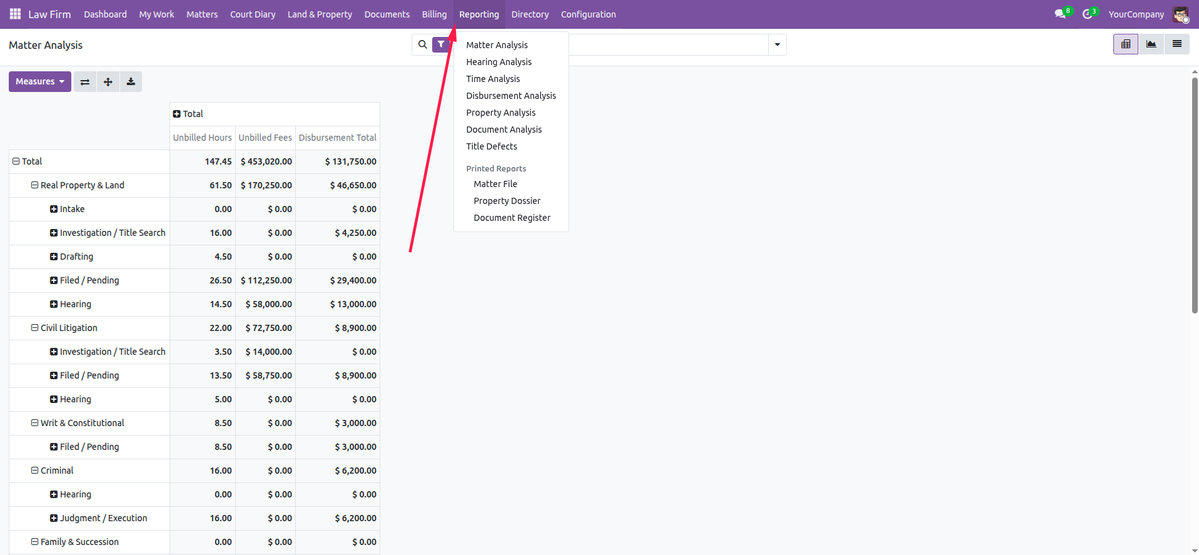
Every practice report opens as a preview, a PDF or an Excel file — straight from the dashboard.
What This Module Will Not Pretend
A tool used on land titles has to be honest about its limits. These are stated in the product, not buried in the small print.
|
OCR reads print, not handwriting
Tesseract is trained on typeset text. On a handwritten deed the printed parts are read and the handwritten body is not — and the module says so instead of inventing a number.
|
Limitation periods ship unverified
Every default names the provision it came from and stays marked unverified until a qualified person in your jurisdiction confirms it. A missed limitation cannot be undone.
|
Local land measures are not standardised
Acre, hectare, square foot and decimal are exact. Katha, bigha and kani differ by district, so they ship marked not exact — and kani ships disabled.
|
Disclaimer. This module is a records-management and text-extraction tool. OCR output is a machine's reading of a scan and is not a certified copy; it does not constitute legal advice, a title opinion, or a substitute for a search at the competent registry. Always verify against the original instrument.
What You Get
|
13 practice areas, 73 matter types Matter pipeline, calendar and activities Checklist templates per matter type Parties register reusable across matters Hearings with reminders and adjournments Cause list grouped by court Limitation watchdog with day and month periods |
Conflict-of-interest check across all records Land parcels with survey identifiers Configurable local area units Chain of title with gap detection Encumbrance register with release tracking Document vault with custody status Over twenty ready-made document types |
Text-layer and Tesseract OCR reading Side-by-side scan and text preview User-editable extraction rules with a test button Word (.docx) transcript export Batch reader and background queue Time, disbursements and draft invoicing Matter file, property dossier and register reports Reporting menu: pivot/graph analysis, plus dashboard reports with PDF & Excel |
For AdvocatesYour caseload, your court dates and your limitation deadlines in one place — and a conflict check you can evidence. |
For Land PracticesSurvey identifiers, chain of title, encumbrances and the deed vault, with gaps and unmutated transfers surfaced automatically. |
For Practice ManagersUnbilled work, documents awaiting review, outstanding papers and the firm's caseload by practice area. |
Built to Fit Your Odoo
| Edition: Community & Enterprise |
Depends on: Mail, Portal, Product, Invoicing, UoM |
Languages: EN, BN, AR, FR, DE, ES, ZH |
License: OPL-1 |
System packages tesseract-ocr and poppler-utils, one Tesseract language pack per language you scan
(for example tesseract-ocr-ben), and the Python packages pytesseract, pdf2image,
Pillow and python-docx.
If any of it is missing the module keeps working for text-layer PDFs and the Engine Status panel names exactly what to install — it never fails silently.
Extraction rules, land area units, practice areas, matter types and checklist templates all ship as data records you can edit — no developer needed to adapt the module to your registry's paperwork.
Support & Developer Details
For installation help, customization, additional practice areas, extra extraction rules or implementation support, contact the maintainer.
| Name: Abdullah Al Arafat |
Mobile/Whatsapp: +8801712192445 |
Email: imbipul9@gmail.com |
Highlights
- POS, Sales and eCommerce delivery orders • Driver management and dispatch • Service zones, routes and cash on delivery • Operational reports