

|
Odoo 19 Community — no Enterprise module required
Easy Diagnostic Center with AIA walk-in patient to a signed report — in seven stages, on one screen at a time.Register → Order tests → Bill & pay → Collect sample → Process & enter → Validate → Deliver. A pathology lab, medical laboratory or diagnostic centre run end to end, with a tile-based test picker, a barcode collection queue, a reference-range result matrix and a dashboard with alerts — built for Odoo 19 Community.
Front Desk
Laboratory
Billing
Staff
Payroll
|
Built for
Front Desk & Registration Cashiers Phlebotomists & Technicians Pathologists Lab Managers & Owners
Eight role groups, record rules and multi-company support throughout.
|
|
7 Stages
Register to delivery, one board per stage
|
6 Lab Sections
Haematology to Imaging, with real cap colours
|
8 Role Groups
Only the cashier ever touches money
|
Real Ledger
Bills are ordinary customer invoices
|
Why This Module
A front desk clerk, a phlebotomist and a cashier run this software — not a lab informatics team. So there is one screen per stage and one primary button per stage: the front desk registers and orders, the phlebotomist collects, the technician enters, the pathologist validates.
A sample is a container, not a test. Two tests drawn into the same EDTA tube are one thing to collect, one label to stick and one tube to carry — which is the whole point of a collection queue that counts containers instead of tests.
Every value that reaches a report passes through the same reference range and flag logic, whichever screen it was typed into. A technician can enter and resubmit; only a pathologist signs, and a critical value raises an alert rather than waiting to be noticed.
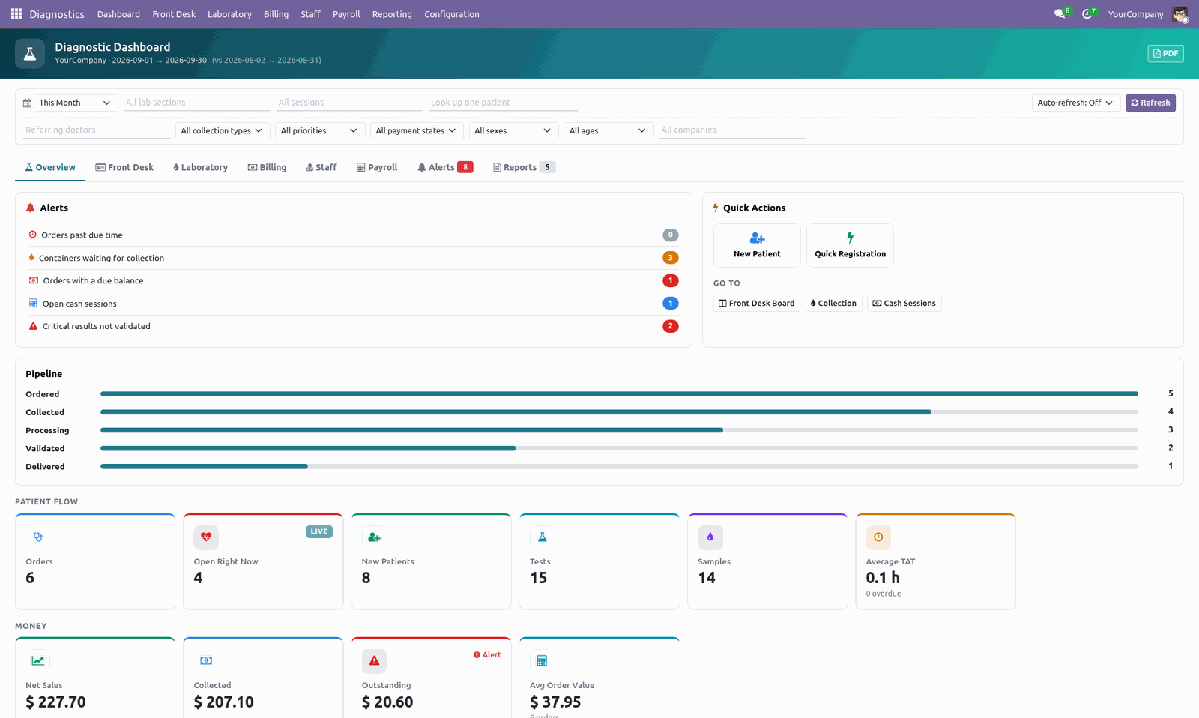
The Diagnostic Dashboard — eight tabs, a pipeline funnel, an alert board and role-aware Quick Actions, filterable by lab section, session, doctor, sex, age and more.
Front Desk & RegistrationA Front Desk board with one card per order, grouped by stage, plus a Quick Registration wizard that checks phone or ID for a duplicate patient, allocates the patient sequence and derives age from date of birth. |
Test PickerTile-based, grouped by Lab Section plus Package and Unfiled. Price, turnaround time, sample type and container all come from the test itself, and sex- or age-restricted tests are refused on the spot. |
Bill & PayInvoice posted and payment reconciled in one step. Discount above a per-group limit needs a supervisor PIN, and the money receipt prints together with the barcode sample labels. |
Collection QueueOne tile per container, coloured by its real cap colour. Collect or reject by click or barcode scan; a rejected sample chains straight to a recollection so nothing is retyped. |
Result SheetAn editable tests × parameters matrix, with reference ranges by sex and age, High / Low / Critical flags, calculated parameters and a delta check against the patient’s last value. A Batch Result Entry screen enters one test for a whole day’s samples at once. |
Validation & DeliverySingle or multi-select validation with a digital signature and critical-value alerts. Deliver by print, email or a portal link with an access token; reprints are watermarked COPY, and a public QR page verifies a report. |
Diagnostic DashboardEight tabs — Overview, Front Desk, Laboratory, Billing, Staff, Payroll, Alerts, Reports — with KPI cards, drill-down charts, a filter bar, PDF export and an AI Agent panel, with optional auto-refresh. |
Staff & AttendanceA diagnostic role and bench live on the ordinary Odoo employee record, with licence number and expiry, a per-pathologist report signature, and collected / entered / validated counts. Attendance tracks late minutes and overtime — no parallel HR model. |
Payroll & ReportingSelf-contained contracts, salary rules and structures; payslips computed from attendance, overtime and weekday absence. Eleven reports in all — TAT, test, result, sample, patient, receivables, delivery and payroll analyses, plus a Printed Reports wizard and a Report Deliveries log. |
AI Agent on the DashboardAsk the dashboard a question in plain words and get an answer built from the figures it is already showing. It reads every tab your role may open, so a question asked on Front Desk about the lab is still answered — and the dashboard switches to the tab the answer came from. |
AI Test SuggestionType what the patient is complaining of and get a proposed test list back, picked only from your own catalogue — anything the model invents is dropped before it reaches the screen — alongside the possible conditions those symptoms point to, for the clinician to weigh. |
AI Result ExplanationsA plain-language note on what a single value and its flag mean, for staff reading only, and a separate reassuring summary written for the patient that reaches their report only when a human ticks the box. |
How You Actually Use It — Step by Step
Nine jobs, in the order a diagnostic centre does them: one to set up, seven that repeat every order, one to run the lab.
|
1
|
Configure your lab — once, before the first patientConfiguration → Lab Sections, Sample Types, Tests & Packages, Sessions, Settings. Six lab sections and their real-cap-colour containers ship ready; add your own tests on top. Lab Sections: Haematology, Biochemistry, Microbiology, Serology & Immunology, Histopathology, Imaging. Sample Types: EDTA, serum, fluoride, citrate, urine, stool and swab containers, each in its real cap colour. Tests & Packages: price, turnaround time, sample type, container, sex/age restrictions and parameters with reference ranges. Settings: discount limit and supervisor PIN, partial payment, auto-print receipt and labels, portal link lifetime, uncollected-sample reminder, report header/footer/signature, expected check-in and late grace. |
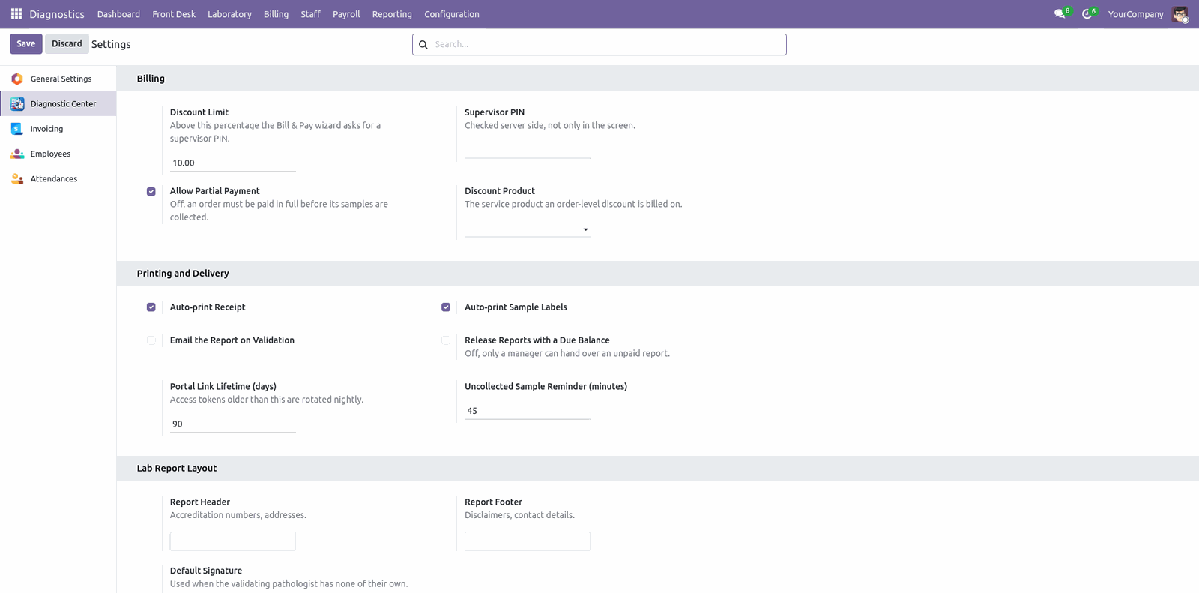
Your policy, in one screen
|
2
|
Register the patient, and watch today’s boardFront Desk → Quick Registration. Three mandatory fields, a duplicate check on phone or ID, and the patient sequence and age are handled for you. Front Desk → Front Desk Board: one card per order, grouped by stage — Draft, Confirmed, Collected, In Process, To Validate, Validated, Delivered, Cancelled. Every card shows the patient, their age and sex, the test count and a critical-result badge when one is waiting. Front Desk → Patients holds the lifetime record: mobile, national/passport ID, delivery preference and consent, with every past order underneath it. |
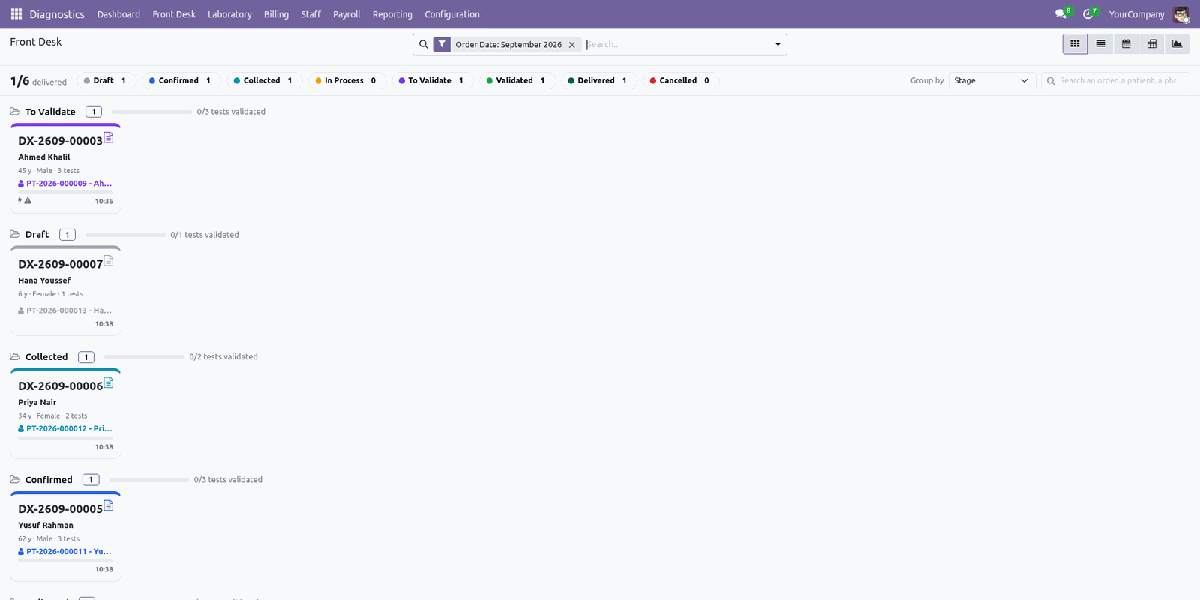
The Front Desk Board — every order, every stage |
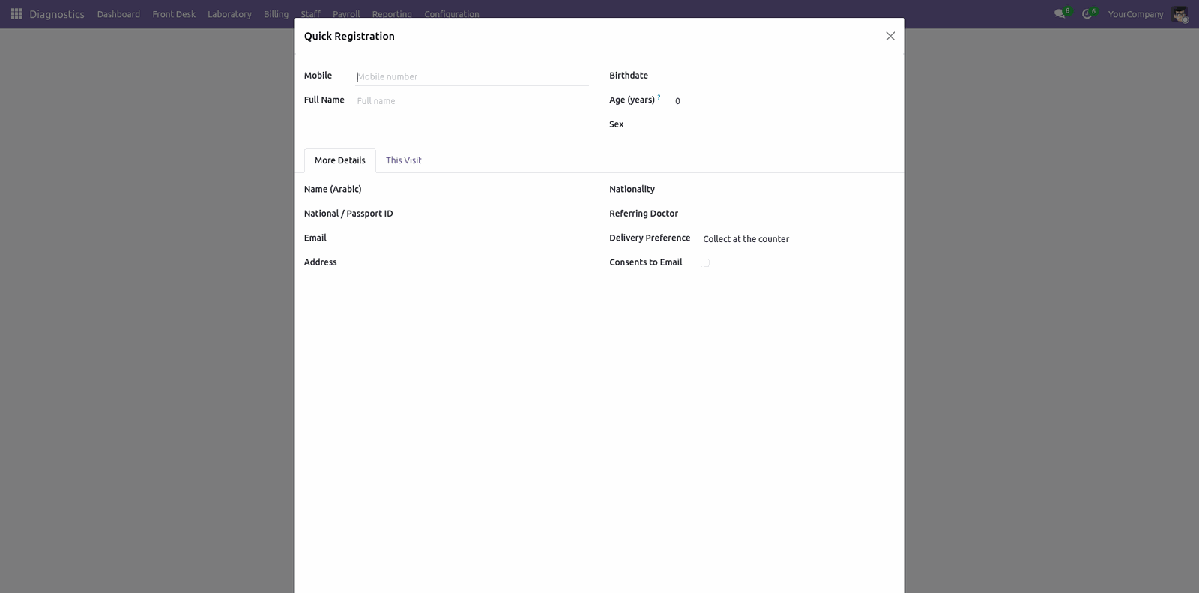
Quick Registration — register and order in one wizard |
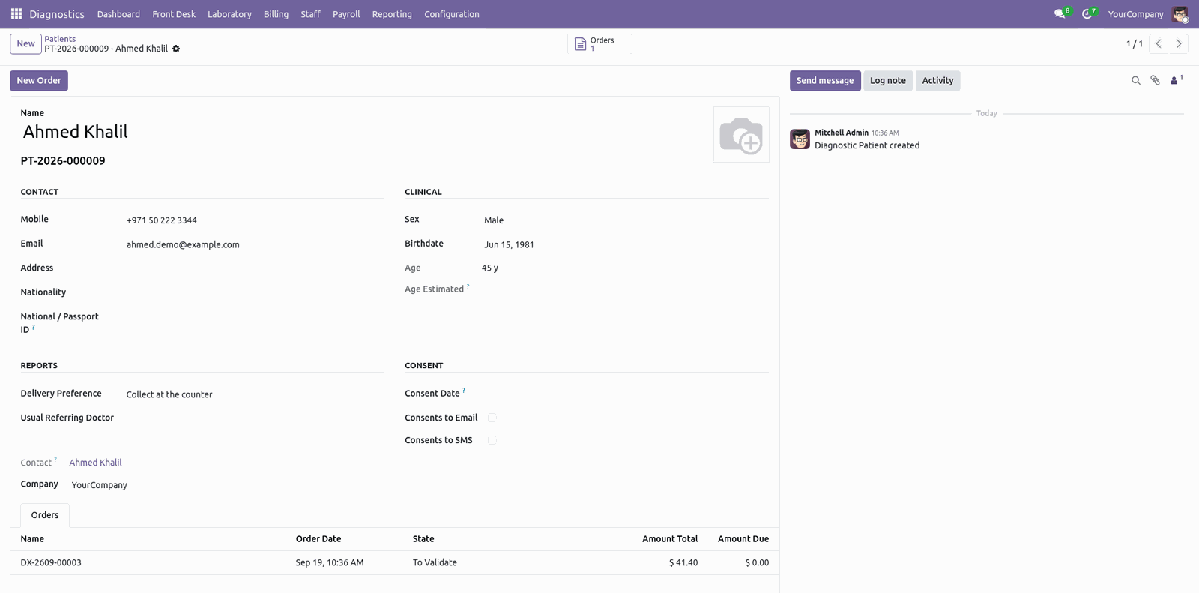
One patient, one lifetime record
|
3
|
Order tests with the Test PickerFrom the order, Order Tests opens a tile board grouped by Lab Section, plus Package and Unfiled groups. Click a tile to add it. Price, turnaround time, sample type and container are all read straight off the test — nothing is typed twice. A package tile adds every test underneath it in one click; a test already on the order is not repeated. Sex- and age-restricted tests — a PSA on a male adult, for example — are refused for a patient the test does not fit. The Tests tab on the order lists every line with its lab section, price and state, right through to Results Entered and Validated. |
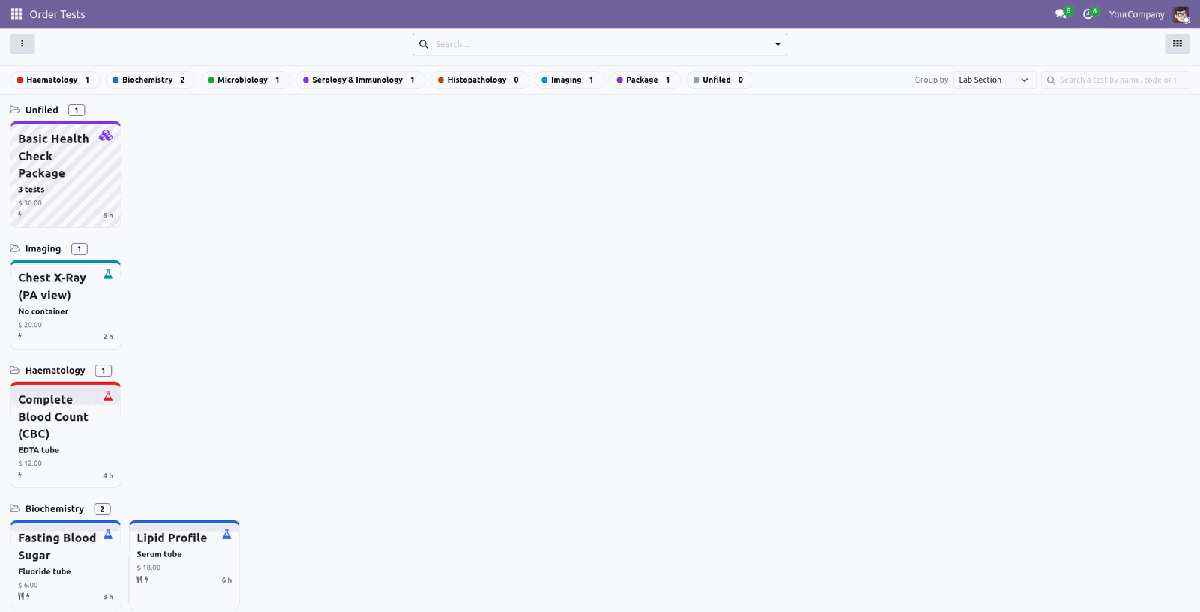
The Test Picker — grouped by Lab Section |
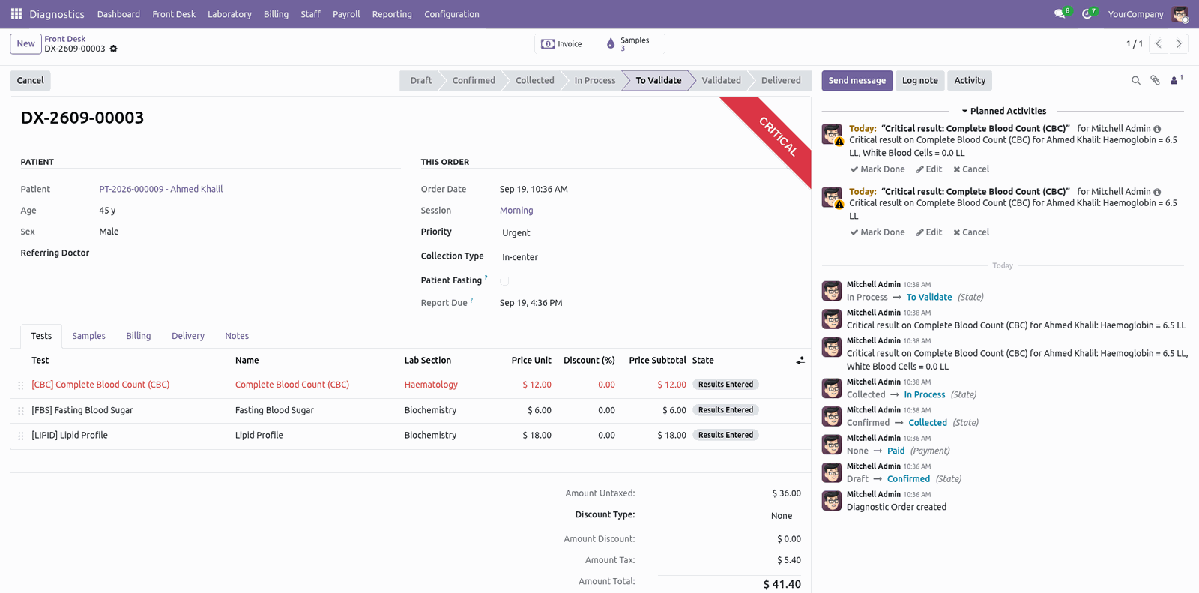
The order’s Tests tab, mid-workflow |
|
4
|
Bill & pay — confirm, invoice and collect in one stepThe Bill & Pay wizard confirms the order, posts the invoice, takes the payment and creates the samples — one button. A discount above the company’s limit needs a supervisor PIN, checked server-side and not only on the screen. Partial payment is a setting, not a workaround: off, an order must be paid in full before its samples are collected. The payment is an ordinary The Billing tab on the order keeps the untaxed, discount, tax, total and amount-due figures — read-only for everyone except the cashier and manager. |
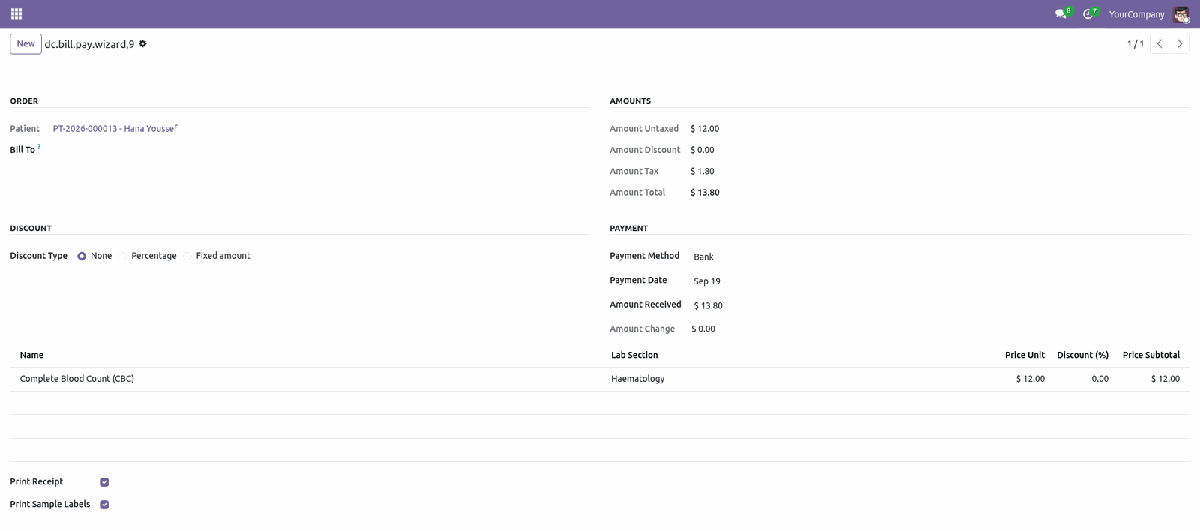
Bill & Pay — invoice, payment and labels together |
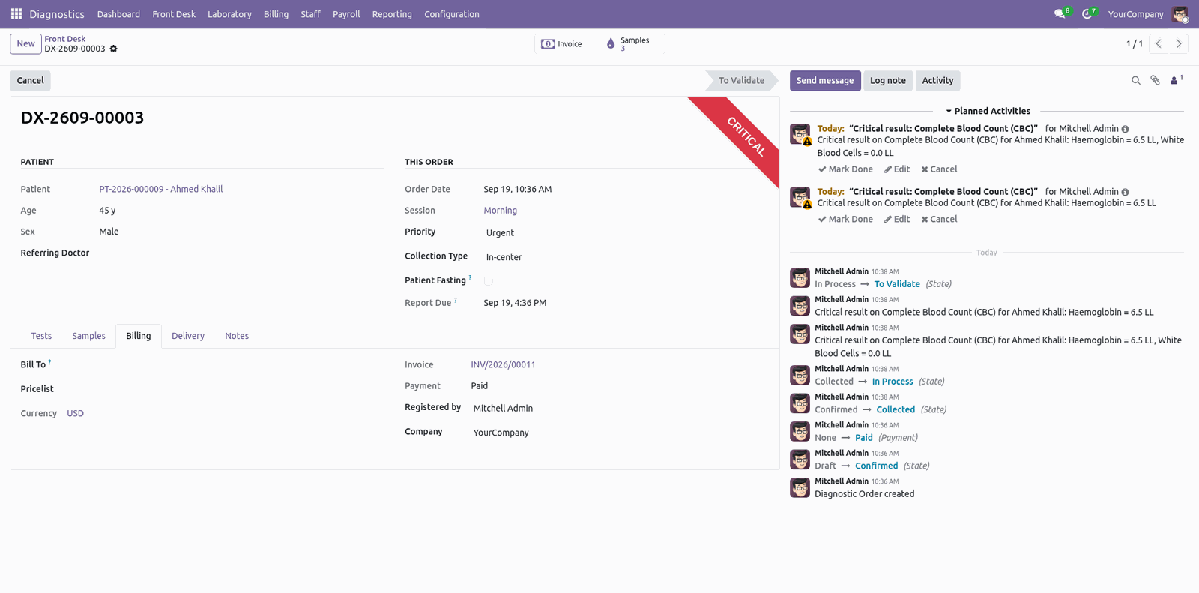
The order’s own Billing tab |
|
5
|
Collect the sample — one tile per containerLaboratory → Collection. Two tests drawn into the same tube are one container, so the queue counts tubes, not tests. Each tile takes its colour from the container’s real cap colour — a rack is read from across the room, the way a phlebotomist actually works. Collect or Reject by clicking the tile or scanning its barcode label. A rejected sample chains straight to a recollection, with the reason kept on the order. The Samples tab on the order lists every container with its state, from To Collect through Received in Lab. |
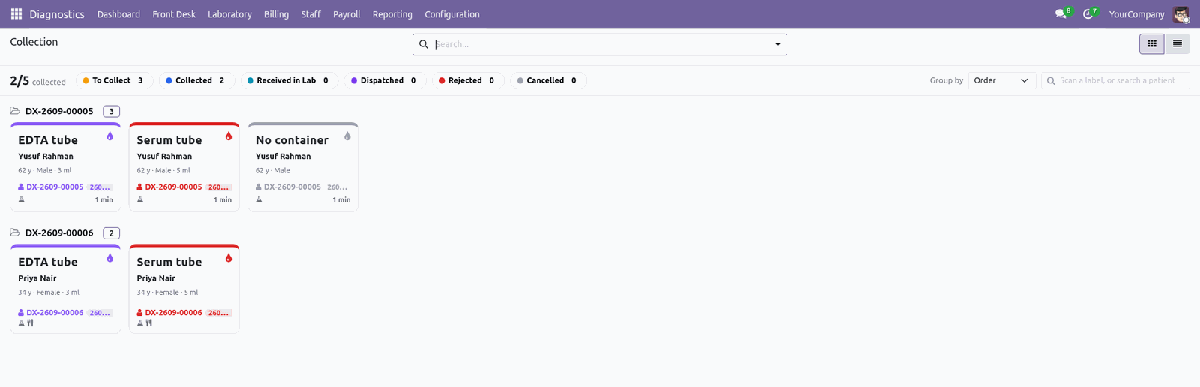
The Collection Queue — one tile per container |
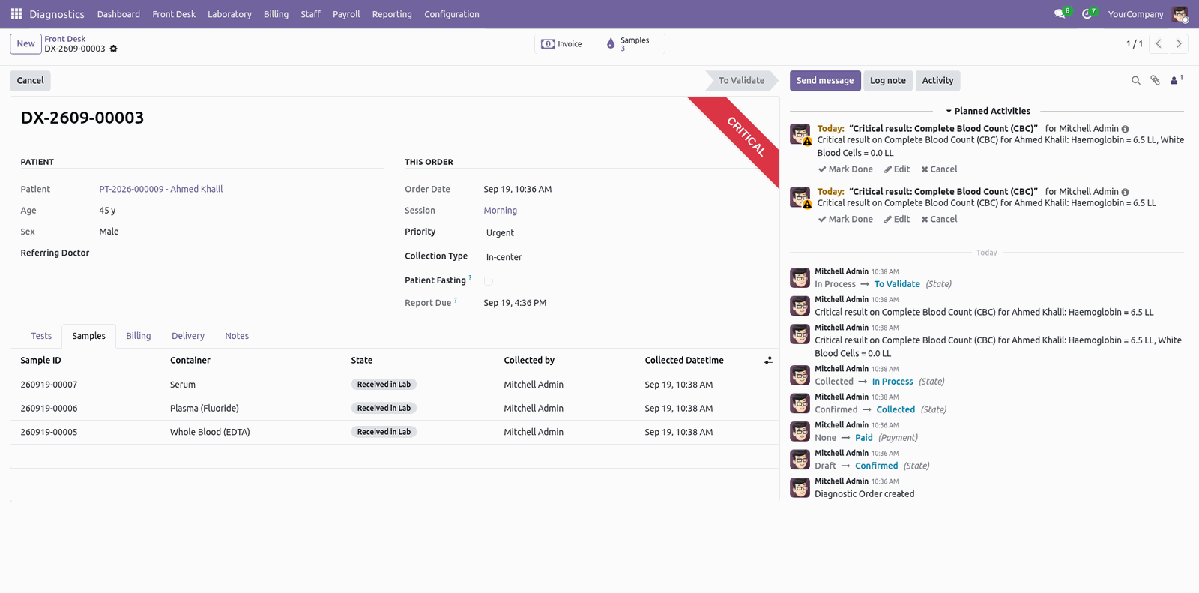
The order’s own Samples tab |
|
6
|
Process & enter — the worklist and the result sheetLaboratory → Worklist shows every test as a tile, grouped by Lab Section, with a progress bar of parameters entered. Open Result Sheet for one order: tests down the rows, parameters across the columns — click a cell to type a value. Flags and the matching reference range are applied the moment you save: L, H, or LL / HH when a value is critical — by the patient’s own sex and age. A calculated parameter, such as a haematocrit derived from haemoglobin, fills itself in from the values around it. Batch Result Entry flips the grid the other way — one test, every sample of the day — for a bench that runs one assay at a time. |
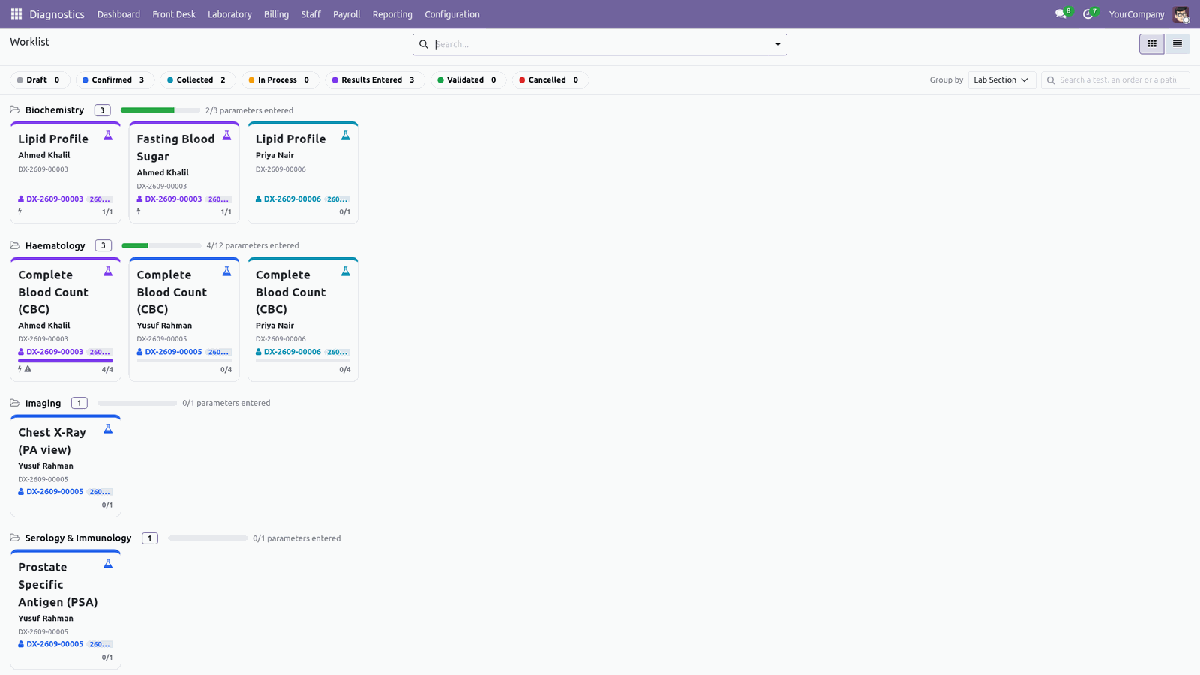
The Worklist — every test, grouped by bench |
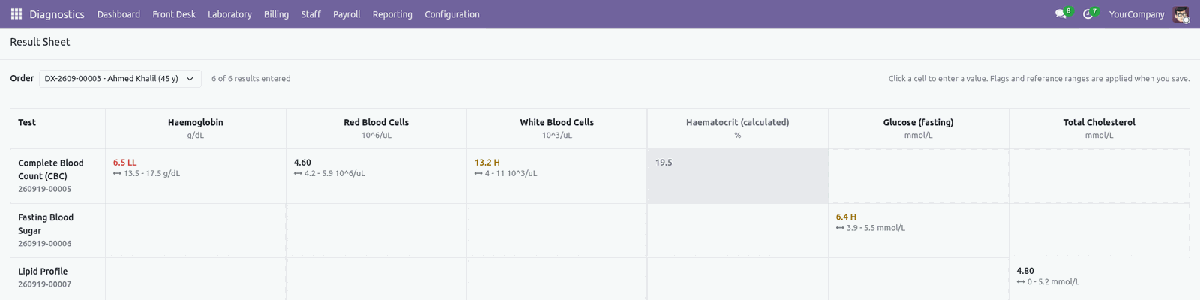
The Result Sheet — a critical value flagged red on save |
|
7
|
Validate, then deliver the signed reportLaboratory → To Validate: submitted results land here, critical ones first — a technician cannot validate their own work. Tick one or many and click Validate; the pathologist’s signature and the validated timestamp are recorded on every line. Front Desk → Delivery lists every validated order still to hand over, with the amount due shown in red so an unpaid balance is never missed. Deliver by print, email or a portal link with its own access token; a reprint is watermarked COPY, and a public QR page lets anyone verify a report is genuine. |

To Validate — critical results first |
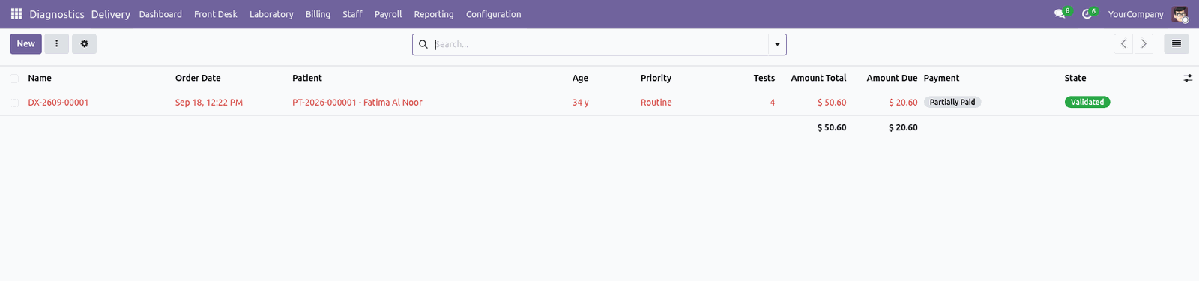
The Delivery queue — the due balance is never hidden |
|
8
|
Staff, attendance and a self-contained payrollStaff → Diagnostic Staff. Tick Diagnostic Staff on an ordinary employee, give them a role and a bench, and their work is counted here — no second HR model. Licence number and expiry, and a report signature stamped on every test that person validates. Attendance on the standard Payroll → Generate Payslips: pick a period, and every running contract is computed — worked days, absence deduction and overtime pulled straight from attendance. |
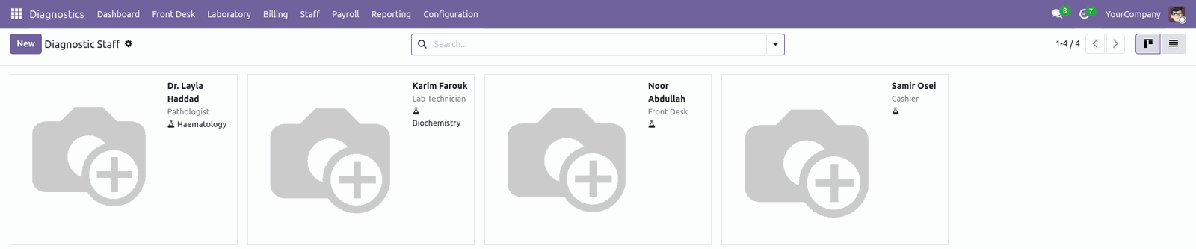
Diagnostic Staff — role and bench on the employee record |
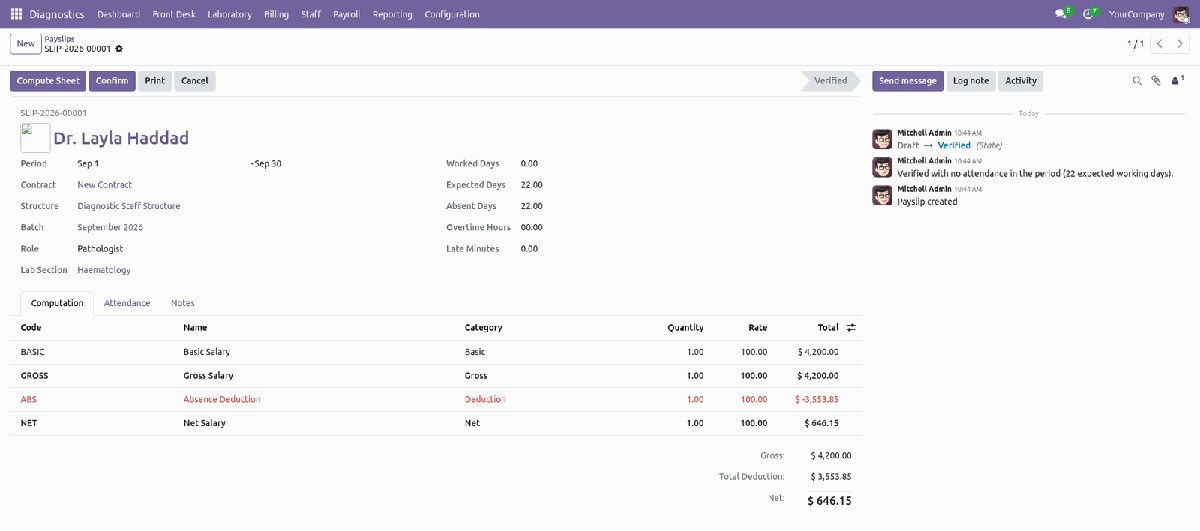
A payslip — computed from the contract and attendance, not typed |
|
9
|
Watch the dashboard, and run the reportsDashboard → Alerts: a red badge counts what is slipping — orders past due time, containers still waiting, orders with a due balance, open cash sessions, critical results not validated. Reporting → TAT Analysis and Test Analysis: pivot and graph views by lab section, test and period, re-sliced and exported yourself. Reporting → Printed Reports offers exactly two: Daily Collection by cashier, session and journal, and Section Worklist. Reporting → Report Deliveries keeps a log of every report handed over, by which channel and to whom. |
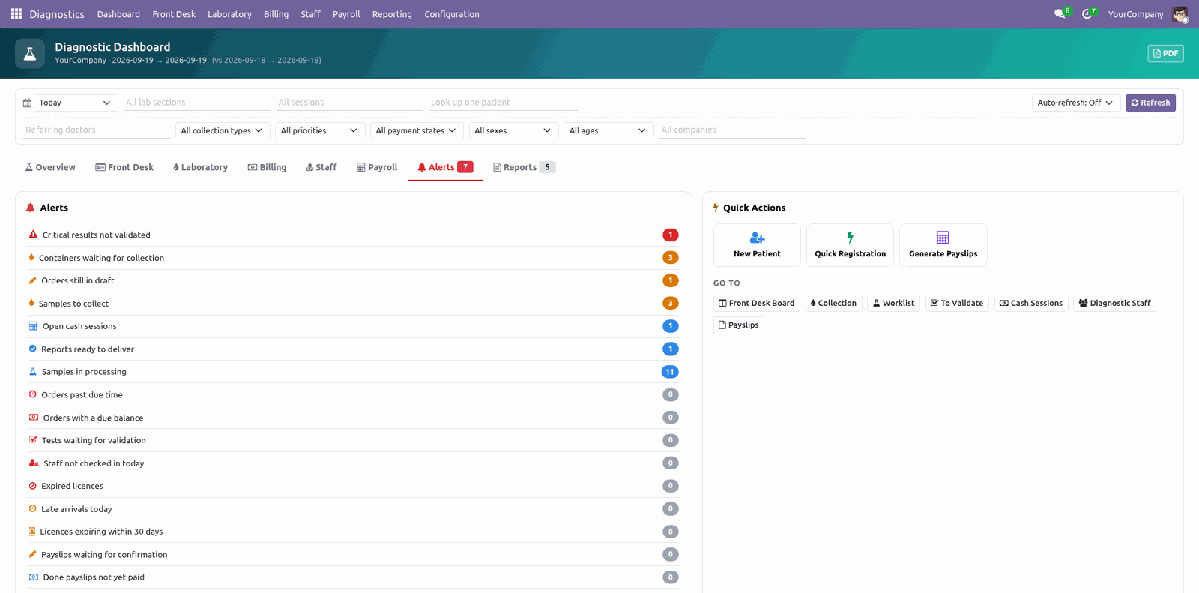
The Alert Board — what needs you right now
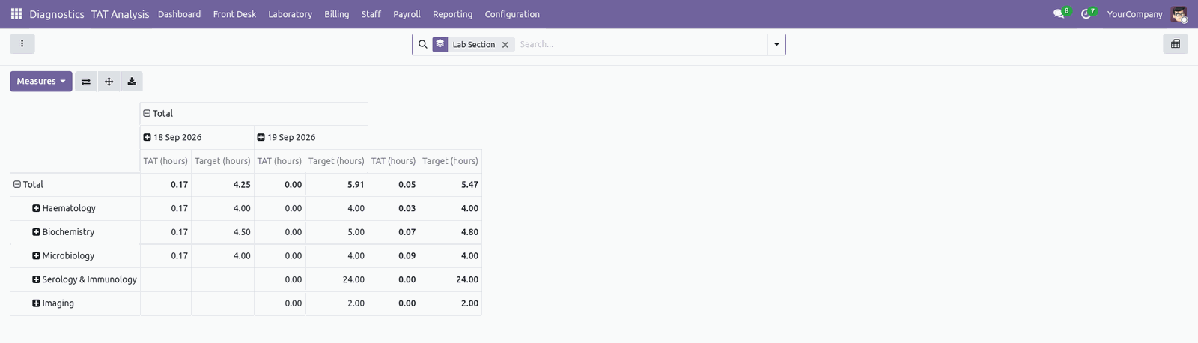
TAT Analysis — actual turnaround against target, by lab section
Eight Roles — Only the Cashier Ever Touches Money
Each role implies the ones under it, so a technician can also collect and a manager stacks every role plus configuration and reporting. Record rules keep an order, sample and result inside the user’s own company.
| Front Desk | Registers patients, opens and manages orders, Quick Registration, the Patients list, the Delivery queue. Never bills or takes a payment. |
| Cashier | The only role that takes money: Cash Sessions, Invoices, the Bill & Pay wizard. Implies Front Desk. |
| Phlebotomist | Collects and rejects samples on the Collection Queue. |
| Lab Technician | Receives samples, runs the Worklist, Result Sheet, Batch Result Entry and All Samples. Cannot validate their own work. Implies Phlebotomist. |
| Pathologist | Validates, rejects and amends results on the To Validate queue. Implies Lab Technician. |
| Staff Officer | Maintains the Diagnostic Staff directory, roles, licences and Attendance. |
| Payroll Officer | Contracts, Payslips, Payslip Batches, Generate Payslips, and the Salary Structures / Rules / Rule Categories behind them. |
| Diagnostic Manager | Stacks Cashier, Pathologist, Staff Officer and Payroll Officer, plus Configuration (Tests & Packages, Test Parameters, Lab Sections, Sample Types, Sessions, Settings) and every report. |
Analytics, Printed Reports and a Delivery Log
Eleven reports, each gated by the role that owns its data: a cashier sees Receivables, a technician sees Result and Sample Analysis, and only payroll sees what payroll cost. Every analysis opens as a pivot, a graph and a list.
TAT AnalysisTurnaround time in hours against target, as a pivot or a graph, sliced by lab section, test and day — the same figure the dashboard’s Average TAT tile is built from. |
Test AnalysisVolume and net revenue by test, again as a pivot or a graph — which tests actually pay for the bench that runs them. |
Printed ReportsA filter wizard offering exactly two printed reports: Daily Collection, grouped by cashier, session and journal, and Section Worklist. |
Result AnalysisNormal, high, low and critical rates per test, parameter and bench. A parameter flagging 90% abnormal usually has a badly set reference range, not 90% sick patients. |
Sample AnalysisRejection rate by sample type and reason, and the minutes a sample spends between collection and the bench. |
Patient AnalysisSex, age band, nationality and referring doctor, with visits and lifetime value rolled up per patient and returning patients marked. |
ReceivablesWhat is still owed, aged into 0-7, 8-30, 31-60 and over-60 day buckets, one row per order that still has a balance. |
Report DeliveryCounter against e-mail against portal, hours from order to hand-over, and the reprint share — a channel with many reprints is one that is not working. |
Payroll AnalysisWhat payroll cost by rule, category, role, bench and batch, rather than one payslip at a time. |
AI That Suggests and Explains — and Never Decides
Optional, and inert until you set a provider. The rest of the module works exactly the same without it.
A Person Always ClicksThe AI never enters a result, never validates one, never changes a price and never adds a test to an order by itself. Nothing it writes reaches a patient’s report unless somebody ticks the box that puts it there. A critical-value alert goes out on its standard wording whether the provider answers, fails or is missing entirely — no AI outage is allowed to delay a phone call. |
No Patient Identity Leaves the ServerPrompts carry figures, test names, parameters, values and flags. Patient names, addresses, phone numbers and ID numbers are deliberately left out. The dashboard agent is handed the same numbers the tab already shows you and nothing underneath them, and it only ever sees the tabs the person asking is allowed to open. |
Your Provider, Including None at AllOpenAI, Anthropic, or a local Ollama server so nothing leaves your building. Bring your own key; there is no subscription to us and no traffic through us. Models can be synced from a running Ollama instance in one click. |
Every Call Logged and CostedOne read-only row per call: which feature, which user, which provider, tokens in and out, and the cost worked out from the prices on the provider record. Failures are logged with their error, so “the AI is broken” has a first place to look. |
Six Printed Documents
Every one its own template, drawn without relying on a patched wkhtmltopdf, so headers, barcodes and columns come out right on an ordinary server.
|
Lab Result report Money Receipt |
Sample Label, with barcode Section Worklist |
Daily Collection sheet Payslip |
Your Policy, Not OursDiscount limit and supervisor PIN, partial payment, auto-print receipt and labels, portal link lifetime, uncollected-sample reminder, report header/footer/signature, expected check-in, late grace and standard hours — all settings, not code. |
Secure by DesignA technician cannot validate their own work; the discount PIN is checked server-side; licence numbers and report signatures sit behind HR rights. Record rules keep every order, sample and result inside the user’s own company. |
Built on Odoo, Not Beside ItPatients are contacts. Staff are ordinary employees, on ordinary attendance. Bills are ordinary customer invoices settled with ordinary payments. Receivables ageing, taxes and multi-currency are Odoo’s own tested code paths — nothing here forks them. |
Less Typing, Fewer MistakesAge is derived from date of birth. Price, TAT, sample type and container come from the test. Flags, reference ranges and calculated parameters are applied on save. Payslips pull worked days, absence and overtime from attendance by themselves. |
Built to Fit Your Odoo
| Edition: Odoo 19 Community |
Dependencies: Accounting, Products, Units of Measure, Barcodes, Employees, Attendances, Portal |
Category: Services / Diagnostic |
License: OPL-1 |
No Enterprise module is required. The Front Desk board, the Collection Queue, the Worklist and the Result Sheet are all built in this module on top of ordinary Odoo widgets, so Odoo 19 Community is enough. Installing it pulls in Accounting, Employees, Attendances and Barcodes, which is where the invoices, the staff records, the check-ins and the label scanning actually live. Multi-company and multi-currency throughout; an Arabic translation is included and the screens are RTL friendly.
Deliberately not included: instrument and LIS interfacing (HL7 / ASTM), radiology image storage (PACS / DICOM), insurance claim adjudication, and home-collection route planning. Each is a project in its own right, and a partial version is worse than none.
Reference ranges, lab sections, sample types and report wording ship as editable data precisely because they are lab- and jurisdiction-specific. Review them against your own clinical and regulatory requirements before relying on them.
Support & Developer Details
For installation help, customization, additional dashboard widgets, custom lab reports or implementation support, contact the maintainer.
| Name: Abdullah Al Arafat |
Mobile/Whatsapp: +8801712192445 |
Email: imbipul9@gmail.com |
Highlights
- Patient and diagnostic workflows • Service and operational records • Center operations tracking • AI-assisted capabilities