

Easy Bank LC Management
Letters of Credit, Bank Guarantees & Trade Finance — from application to settlement.
Connect import and export credits, bank facilities, margin deposits, document presentations, shipments, charges and accounting in one working record. Follow what is due, what is still outstanding and what needs a decision.
Importers & Exporters
Trading & Manufacturing
Finance & Treasury Teams
Managers & Auditors
Why This Module
A credit is more than a bank reference and an expiry date. Purchasing needs the shipment, finance needs the margin and liability, and treasury needs the next due date. This module links those records so each team can follow the same obligation.
Partial shipments, amended terms, export drawings and claims remain visible against the original instrument. Accounting entries, charges and margin movements keep their source links, while the dashboard opens the records behind its figures.
Screenshots show the module running with fictional demo transactions. The optional AI reader is shown at its input step; provider setup is required to use it.
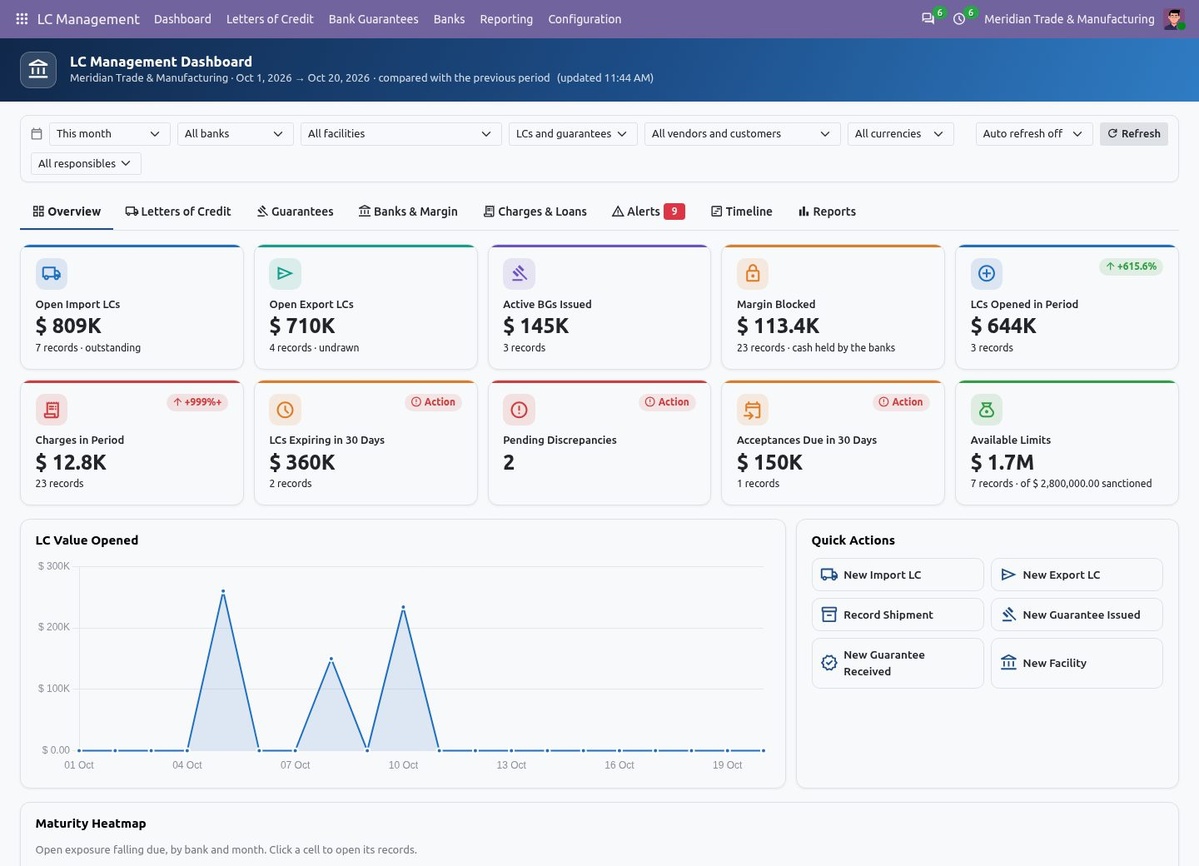
Overview dashboard: KPIs, period filters, charts, quick actions and items needing attention
Your Trade Finance Workspace
Import Letters of Credit
Start from confirmed purchase orders. Track bank references, sight or usance terms, amounts, dates, shipments and payment through a controlled LC workflow.
Export & Realization
Record received export LCs, prepare and submit documents, record bank advances and deductions, and realize proceeds for the whole credit or individual drawings.
Back-to-back Credits
Link supplier credits to a master export LC, control the permitted share, and derive earlier shipment and expiry dates from configurable rules.
Special Credit Types
Revolving credits with reinstatement cycles, standby LC claims and transfers of transferable export LCs to a second beneficiary.
Issued & Received Guarantees
Bid, performance, advance payment, retention, financial, customs and shipping guarantees, with extension, reduction, claim and release history.
Banks & Facilities
Bank contacts, sanctioned limits, shared parent limits, sub-limits, available headroom, utilization, renewal history and warn-or-block policies.
Margins & Accounting
Margin blocking, top-up and release, bank commissions, usance acceptances, payments, exchange differences and linked journal entries.
Documents & Shipment Costs
Required-document checklists, presentation deadlines, discrepancy decisions, receipts, vendor bills and allocation of eligible bank charges to landed costs.
LTR / PAD Loans
Convert accepted import obligations to a loan, select the loan facility, plan instalments, record partial repayments and accrue interest.
Dashboard, Grids & Timelines
Filter KPIs and charts, inspect maturity heatmaps and exposure flows, compare periods, and open the records behind a figure.
Reports & Bank Letters
Sixteen reports with on-screen, PDF and XLSX outputs, plus LC applications, amendment requests and bank guarantee correspondence.
Optional AI Assistance
Read MT700 / MT707 text or a text-based PDF, review suggested LC values, check shipment documents and ask questions about permitted records.
Follow the Work, Screen by Screen
Set up the company, work the instrument through its business actions, then use the dashboard and reports to follow balances and deadlines.
1 |
Set up your accounts, charge types and document checklistConfiguration → Settings brings the trade finance accounts, facility policy, back-to-back rules, alert lead times and optional AI provider together. |
Configure margin, LC charges clearing, bank charges, acceptance liability, loan, interest, negotiation and guarantee claim accounts for the company.
Define charge types as a fixed amount, percentage of amount or percentage per quarter. Choose the expense account or eligible landed-cost product.
Maintain required document types, their order, and the requested number of originals and copies.
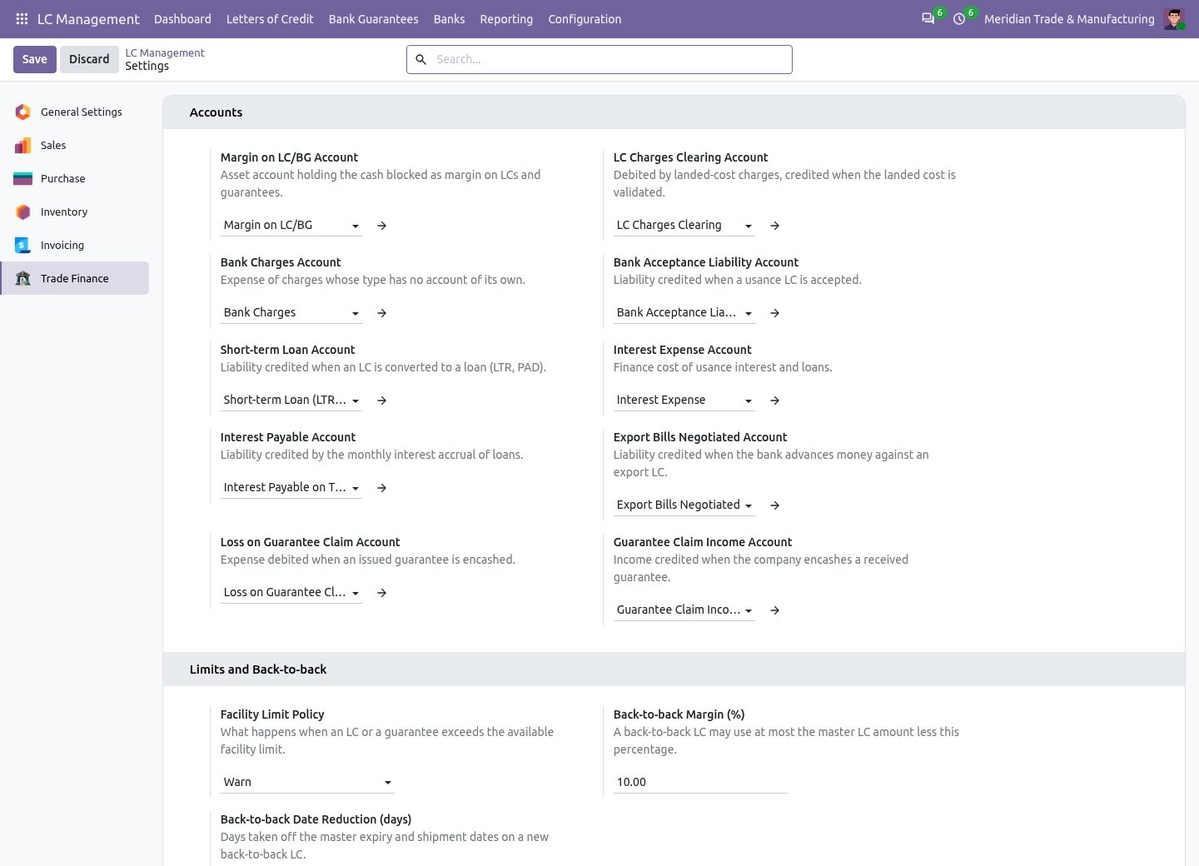
Trade Finance settings: accounting setup and company policies
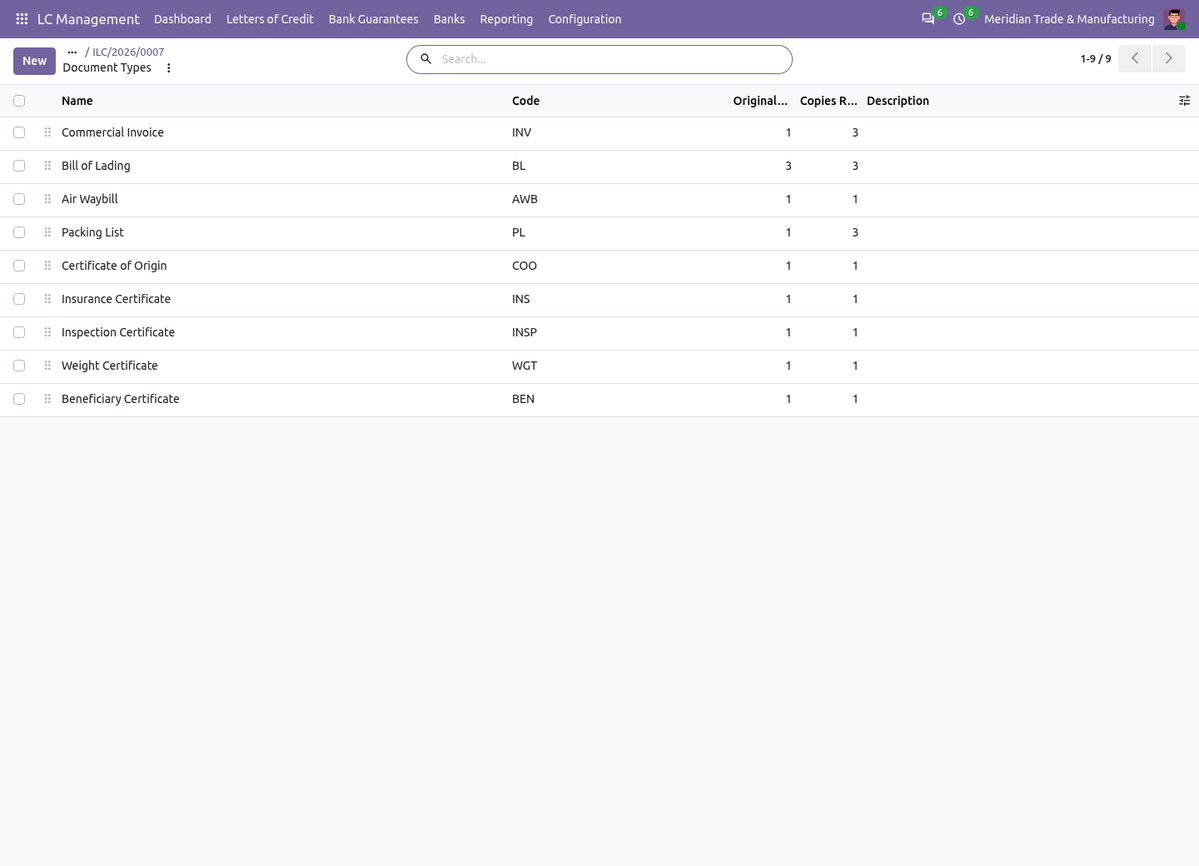
Document types: invoice, bill of lading, packing list and supporting certificates
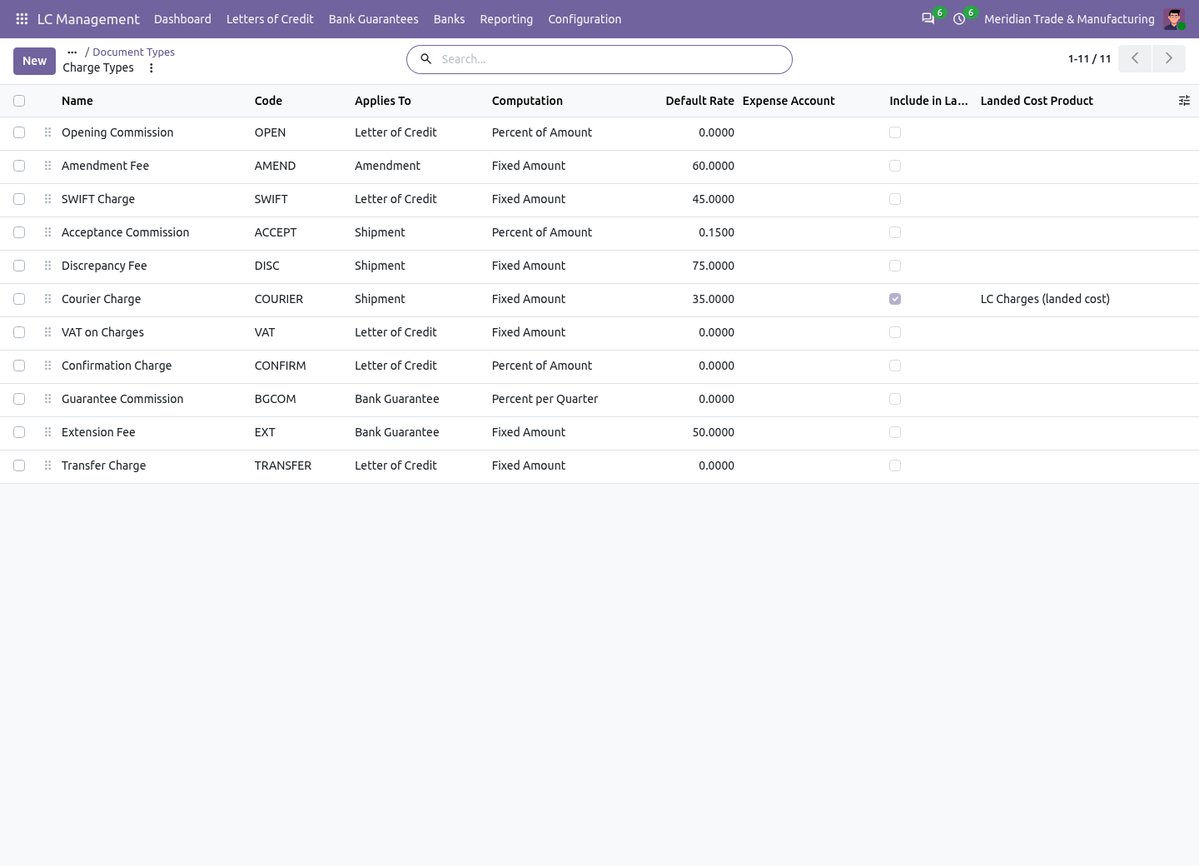
Charge types with computation methods and landed-cost options
2 |
Register banks and manage facility headroomBanks → Banks and Facilities keeps the banking relationship separate from each sanctioned facility and its bank journal. |
Create sight LC, usance LC, back-to-back, bank guarantee, LTR and PAD facilities with currency, validity, margin and commission settings.
Connect sub-limits to a parent facility to share a combined ceiling. Review utilized and available amounts before submitting a new obligation.
Apply the company's warning or blocking policy, and use the renewal wizard to retain the previous and renewed terms.
On a draft import LC, the bank suggestion compares available headroom and the company's posted charge history.
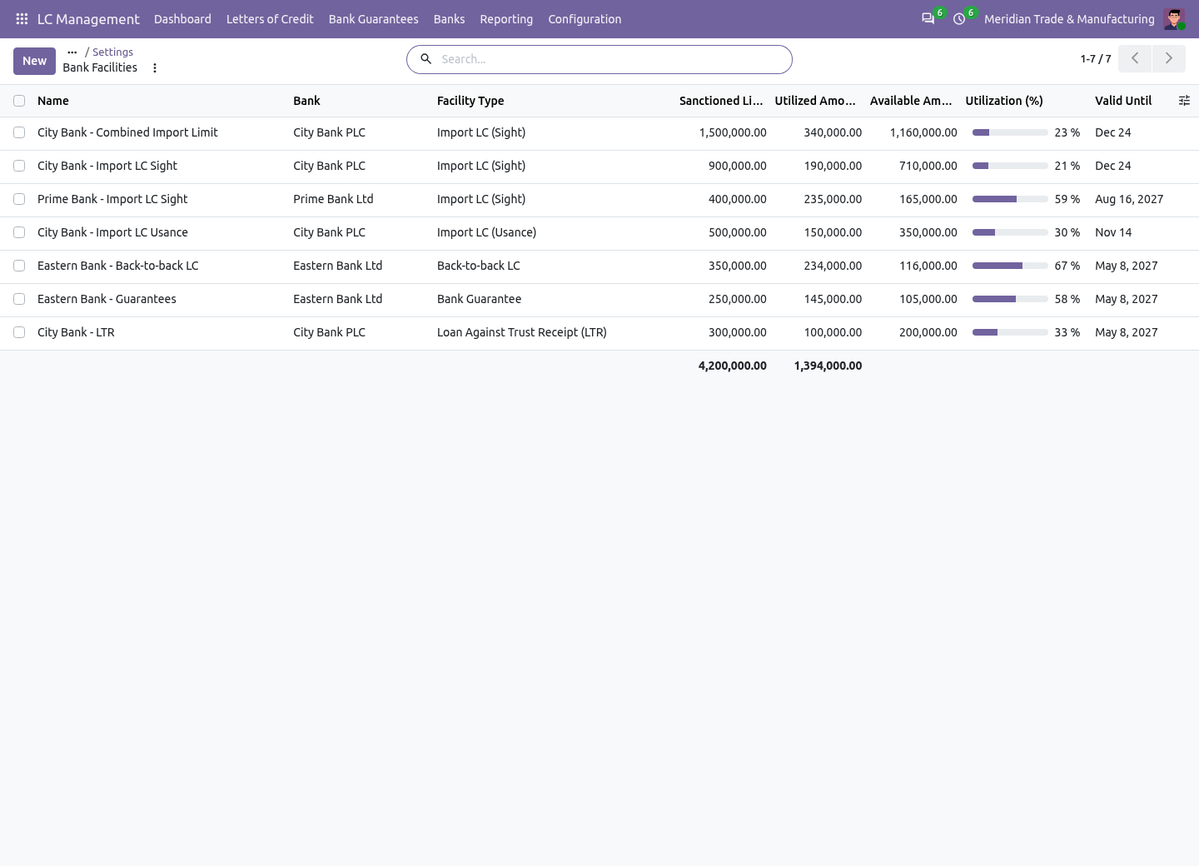
Bank facilities: sanctioned amounts, utilization and available headroom
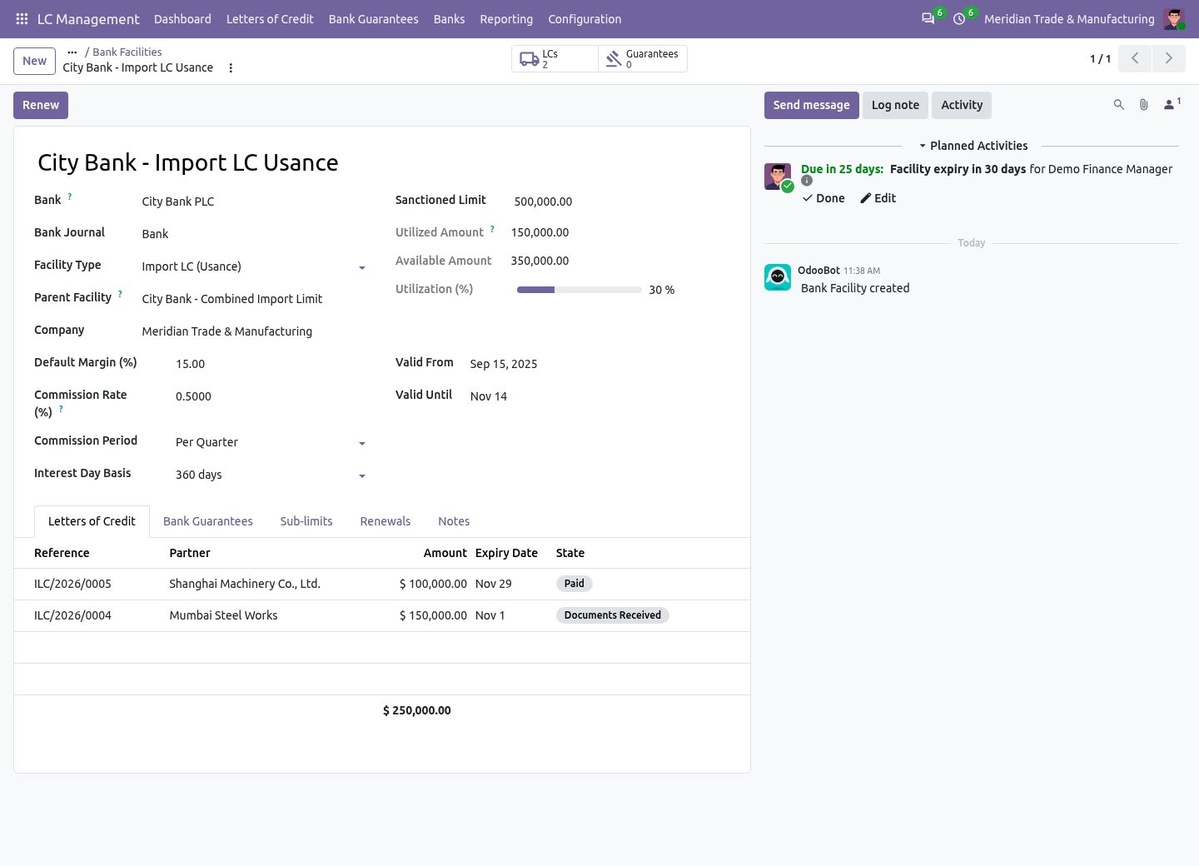
Facility record: bank journal, validity, commission and sub-limits
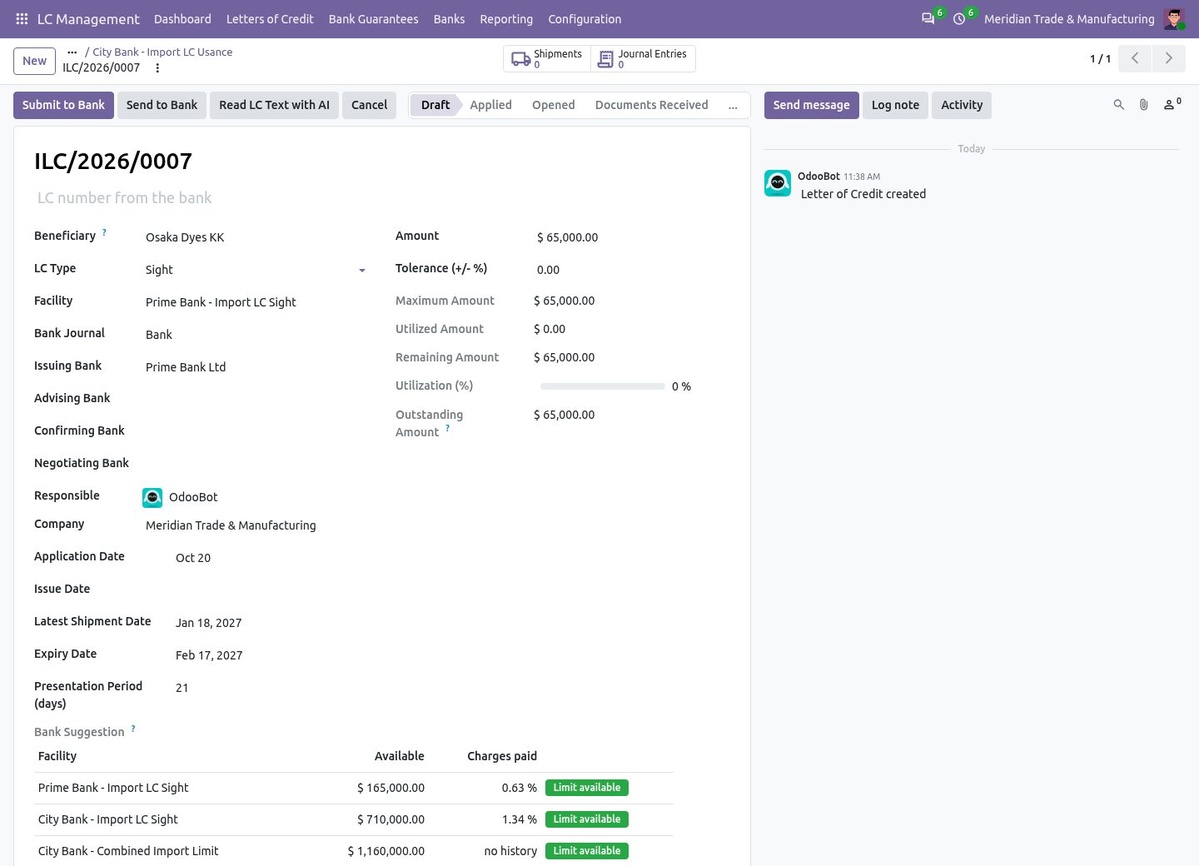
Draft import LC: facilities compared by available limit and historical charges
3 |
Open an import LC from procurementLetters of Credit → Import LC links purchasing and bank finance. A confirmed purchase order can also start the LC through its LC action. |
Choose the vendor, facility, currency and amount. Record the bank's LC number, issuing bank, issue date, latest shipment date and expiry.
Set sight or usance terms, tenor days and basis, tolerance, Incoterm, ports, partial-shipment rules, goods description and required documents.
Submit to Bank, then Confirm Opening when the bank issues the credit. Track utilization, outstanding balance, margin and related accounting.
Opened terms are protected. Use an amendment to change the credit with a recorded approval trail.
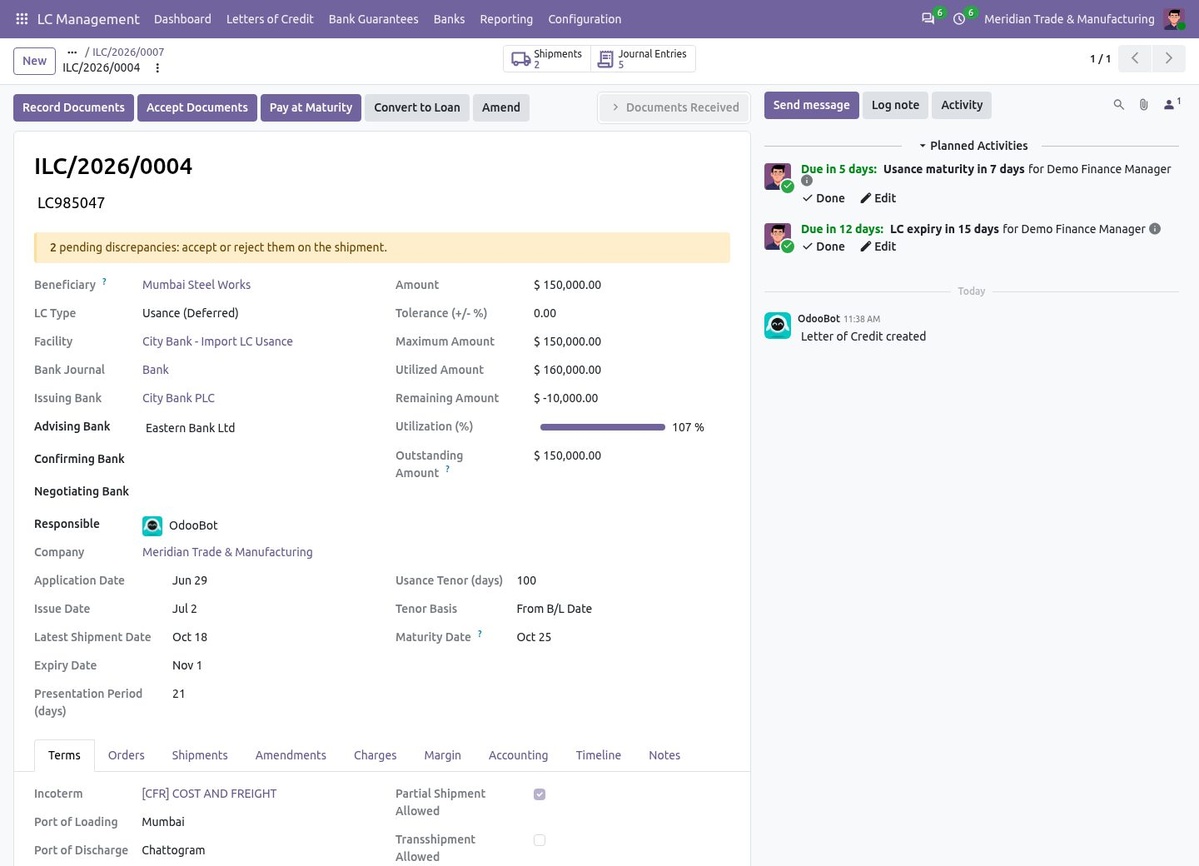
Import LC: bank details, amounts, dates, margin and workflow stages
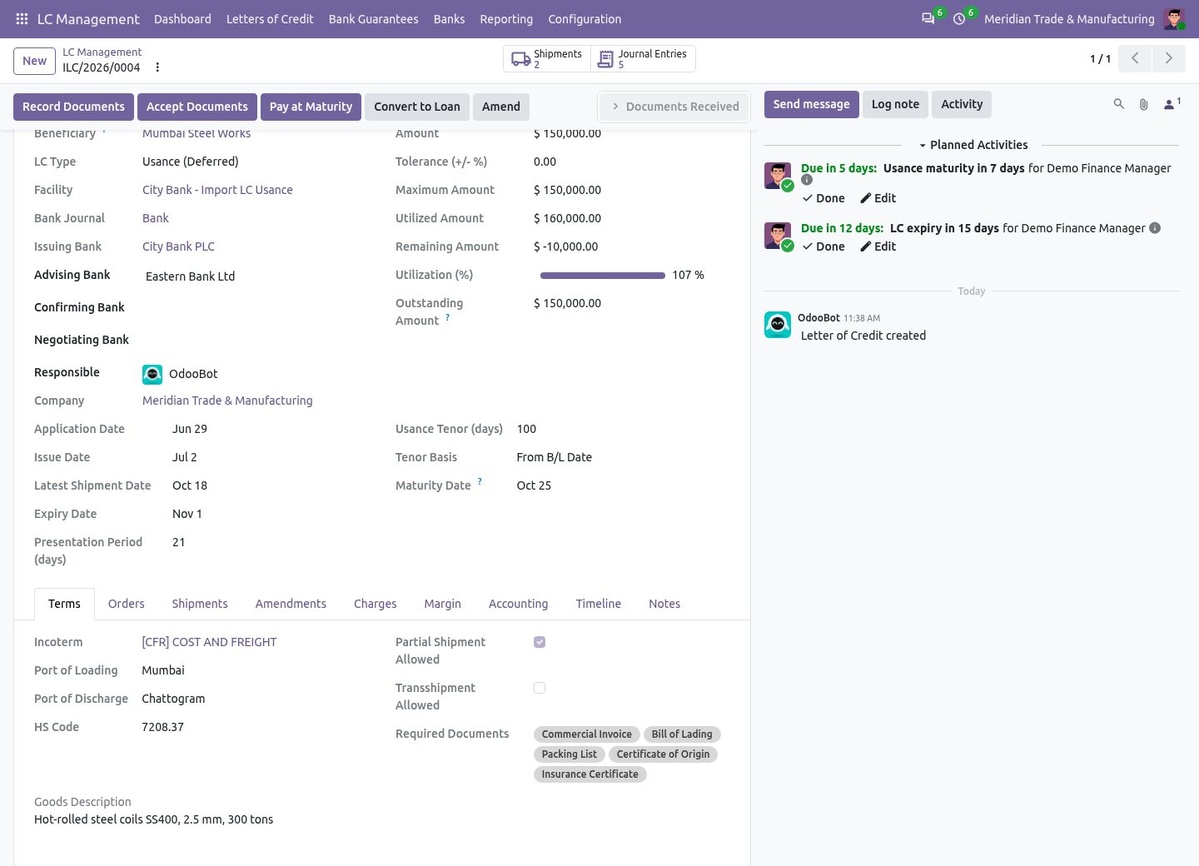
LC terms: goods, ports, presentation period and required documents
4 |
Record shipments, check documents and settle paymentAn LC can cover several shipments. Each shipment carries its own invoice amount, dates, documents, discrepancies and settlement history. |
Record invoice, bill of lading or air waybill, vessel, shipment date, presentation date, vendor bill and linked receipts.
Work through the document checklist, attach supporting files, and record whether each document is received, acceptable or discrepant.
Recording documents checks visible conditions such as late shipment, late presentation, expiry, amount tolerance and partial-shipment rules.
Accept or refuse discrepancy decisions before proceeding. Accept documents, then pay at sight or at usance maturity; eligible charges can feed the shipment's landed cost.
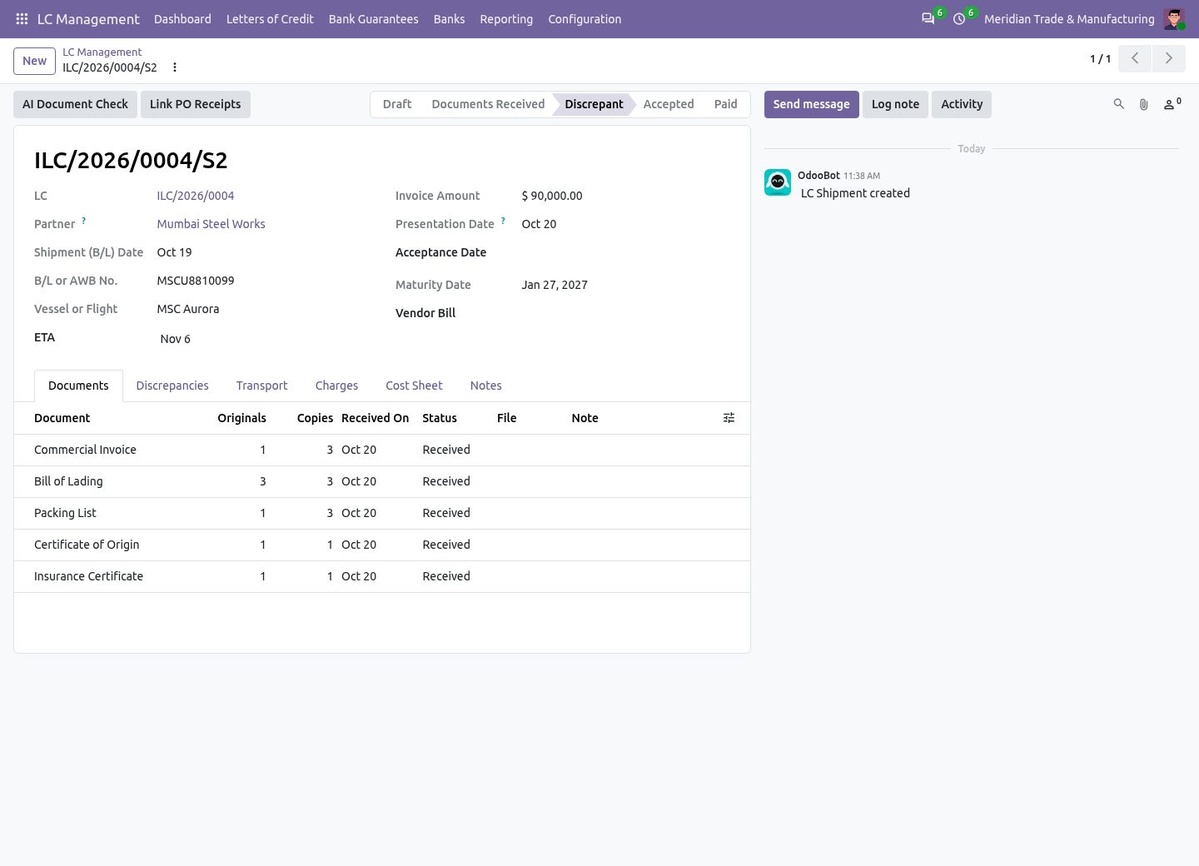
Shipment record: document checklist, discrepancies, invoice amount and maturity
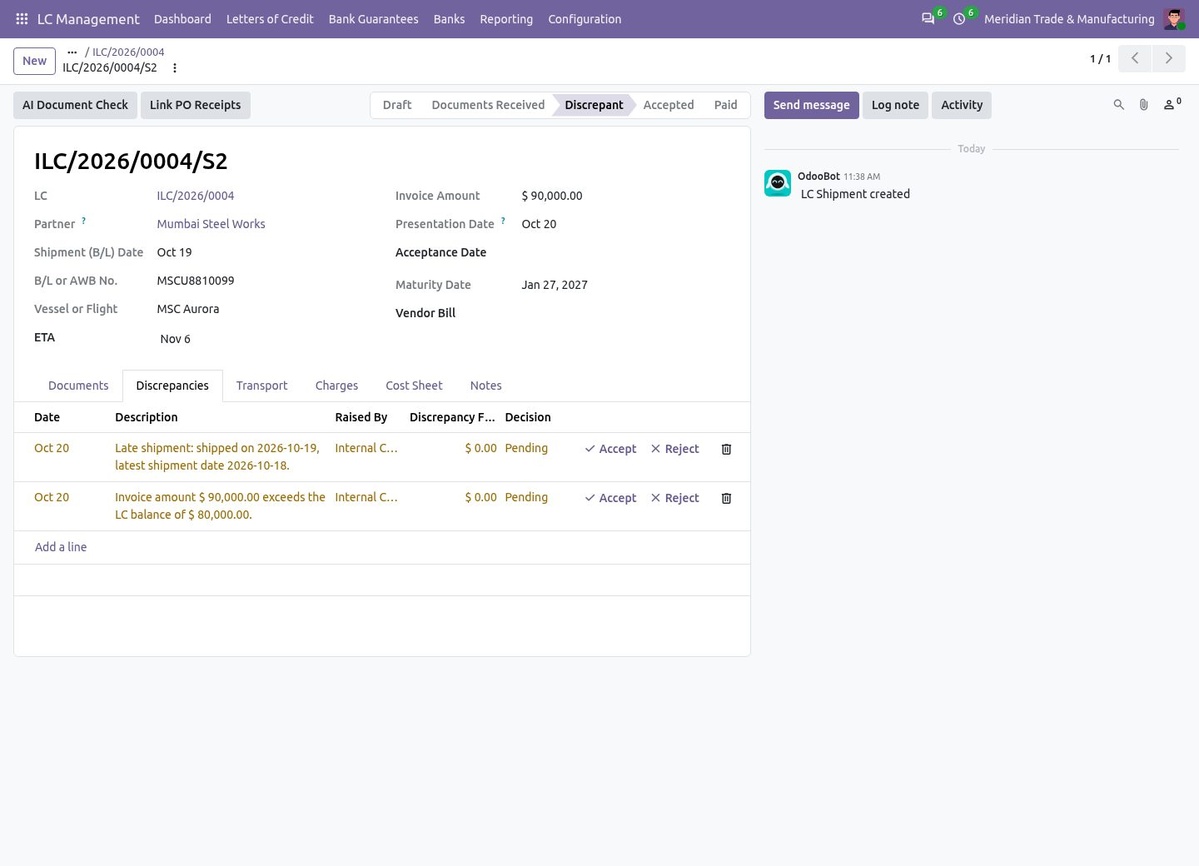
Shipment discrepancies with pending decisions and related fees
5 |
Manage export LCs and individual drawingsLetters of Credit → Export LC records the buyer's documentary credit and links the relevant sales orders. |
Capture the applicant and issuing, advising, confirming or negotiating banks, then accept the export LC.
For one presentation, prepare documents, submit them to the bank, record negotiation and realize the proceeds with bank deductions.
For several presentations, use New Drawing. Each drawing keeps its own amount, submission, negotiation and realization details.
Follow the amount presented, settled and remaining across the credit, with links to the resulting accounting entries.
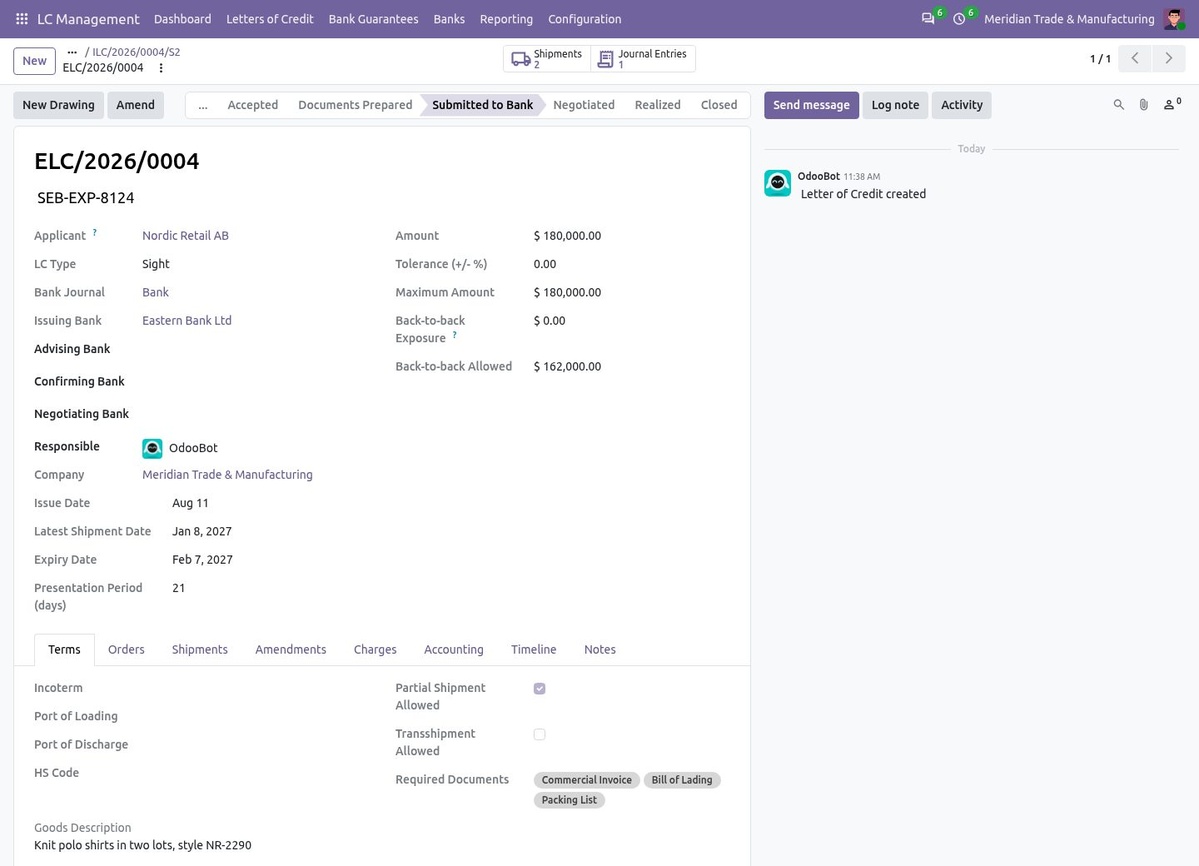
Export LC: customer, credit amount, document workflow and linked drawings
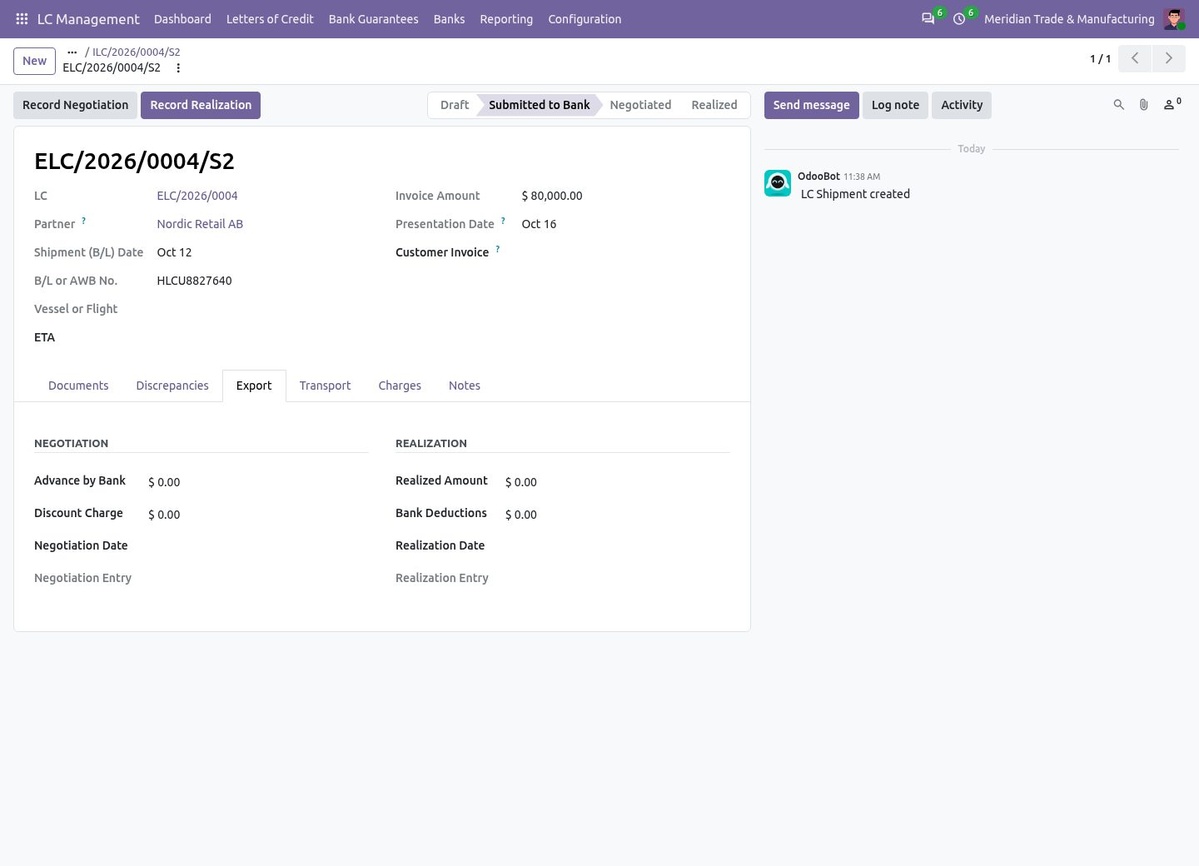
Individual export drawing: presentation, negotiation and realization details
6 |
Open back-to-back LCs against a master export creditUse Open Back-to-back LC on the master export LC to create the supplier credit and keep the relationship visible. |
The permitted amount is derived from the master value less the configured back-to-back margin percentage.
Expiry and latest shipment dates are brought forward by the company's configured number of days.
Review the linked supplier credits and their combined exposure from the master record.
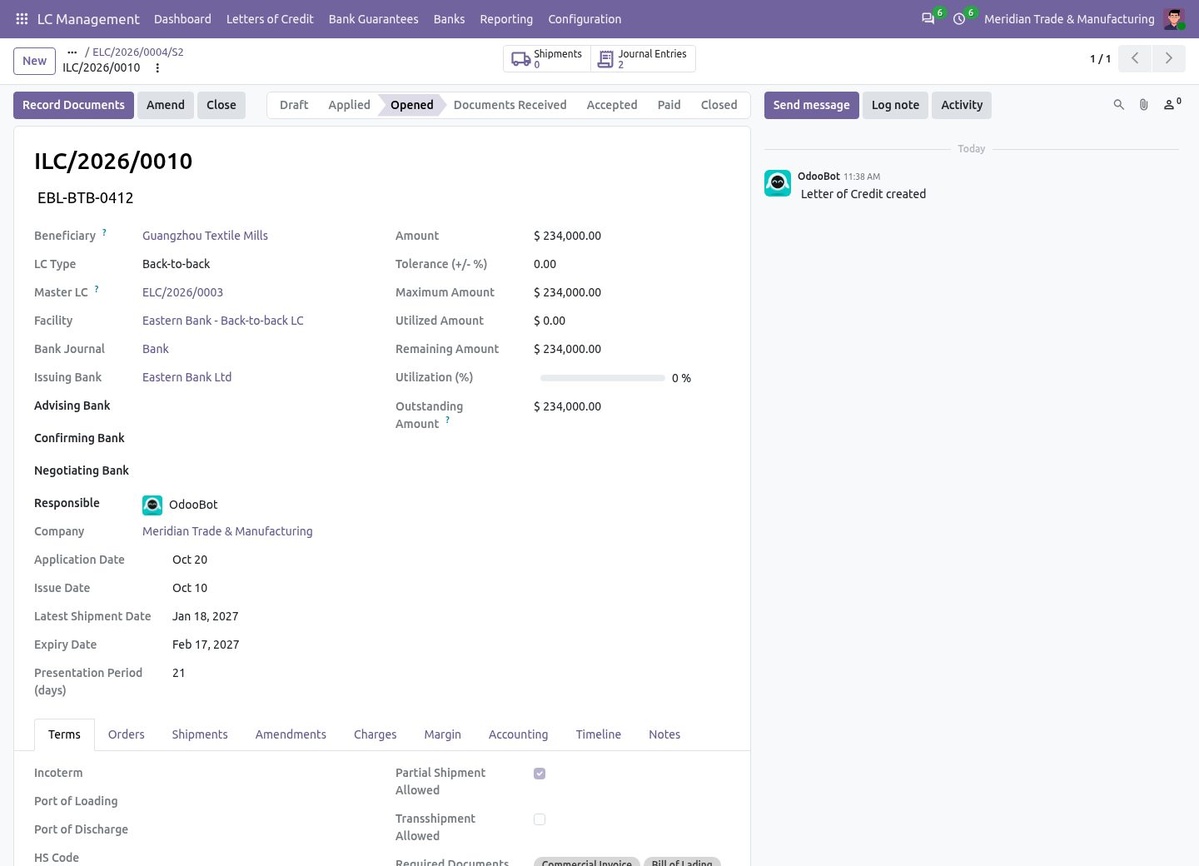
Back-to-back LC linked to its master export credit
7 |
Amend terms with bank and beneficiary responsesUse Amend on an eligible LC to propose a change while retaining the previous terms. |
Request changes to amount, expiry, shipment and presentation dates, tenor, ports, goods, documents and other supported terms.
Keep old and proposed values, the amendment number, bank approval date, beneficiary response and amendment charges together.
Approve the amendment, then record acceptance or refusal by the beneficiary. Send the amendment request letter to the bank from the record.
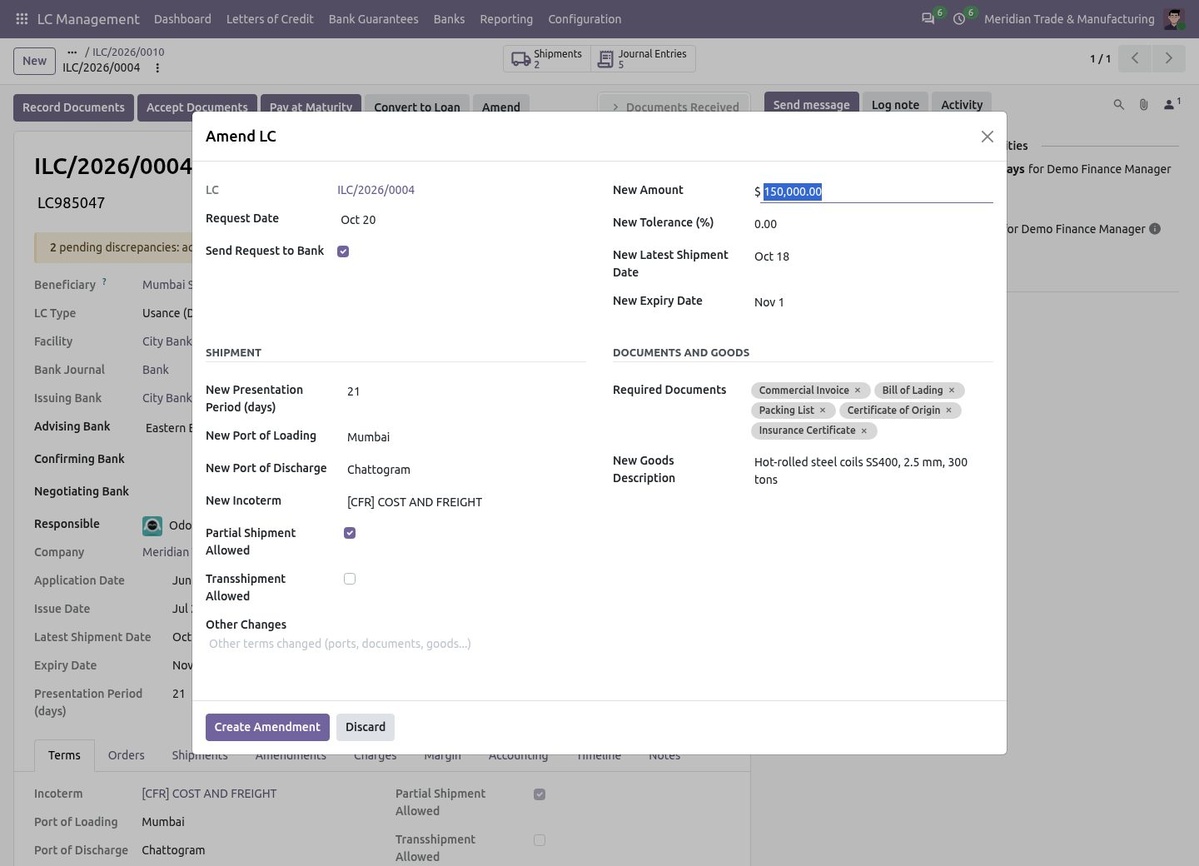
LC amendment wizard: proposed changes to the credit's terms
8 |
Handle revolving, standby and transferable creditsSpecial credit types have their own business actions alongside the shared LC information. |
Revolving LC: set the number of reinstatements and monitor the current cycle, total drawable amount and outstanding exposure.
Standby LC: record a claim and its reference against an opened standby credit, instead of using a goods-shipment presentation.
Transferable export LC: record the second beneficiary, transferred amount, reference, expiry and transferring-bank charge.
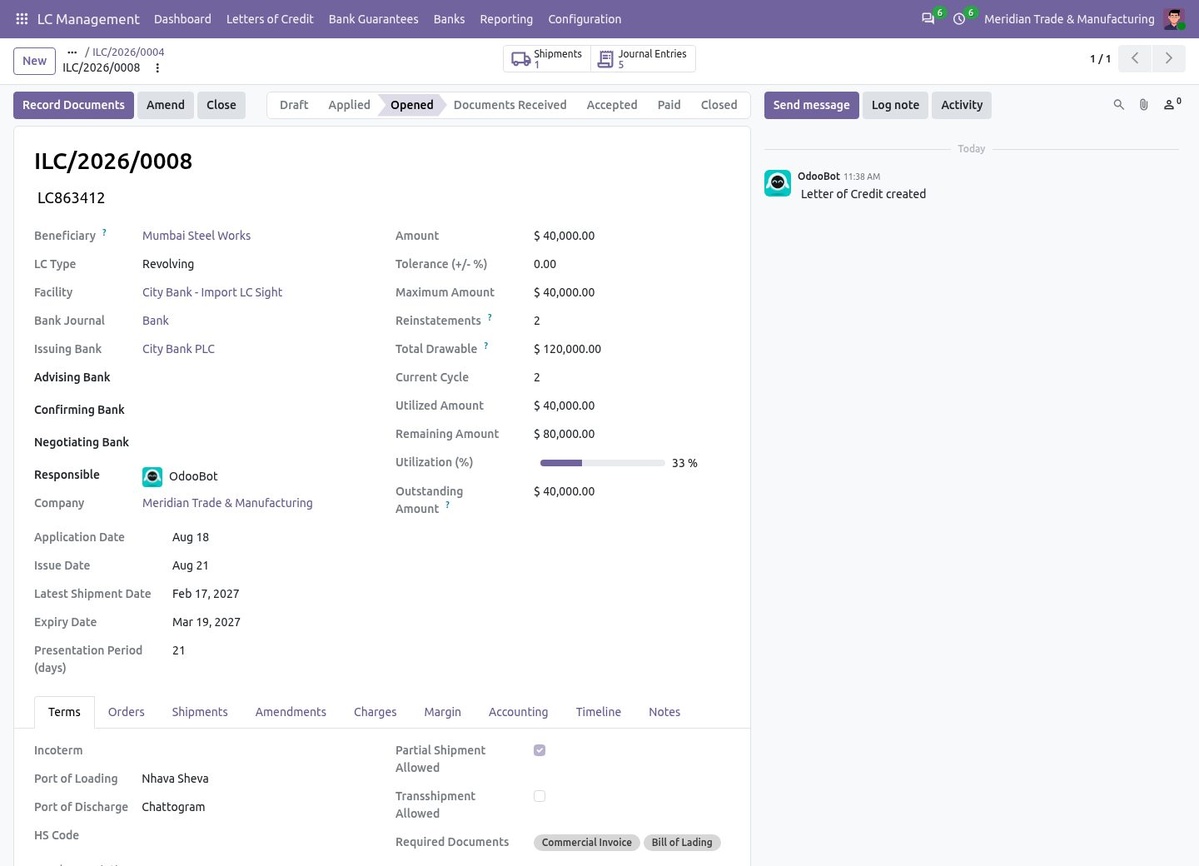
Revolving LC with reinstatements, drawable amount and cycle information
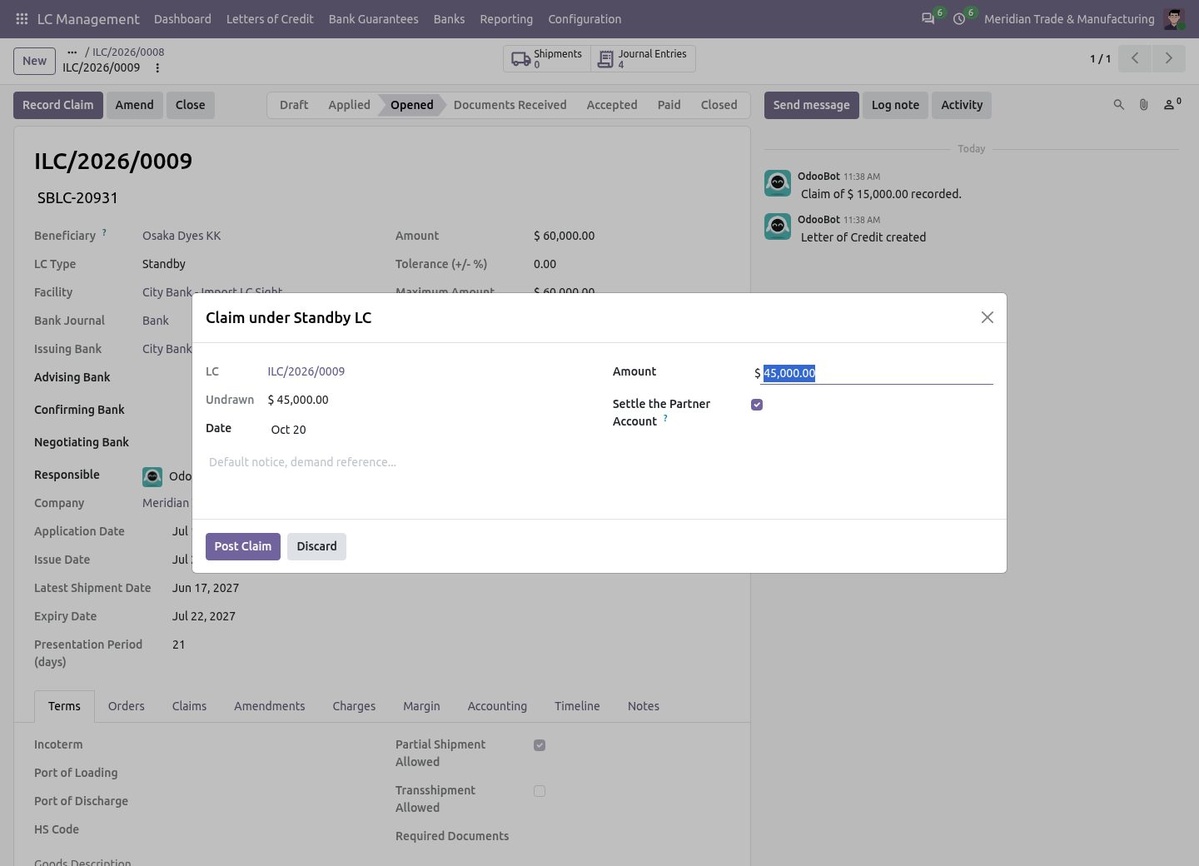
Standby LC claim wizard with amount, date and reference
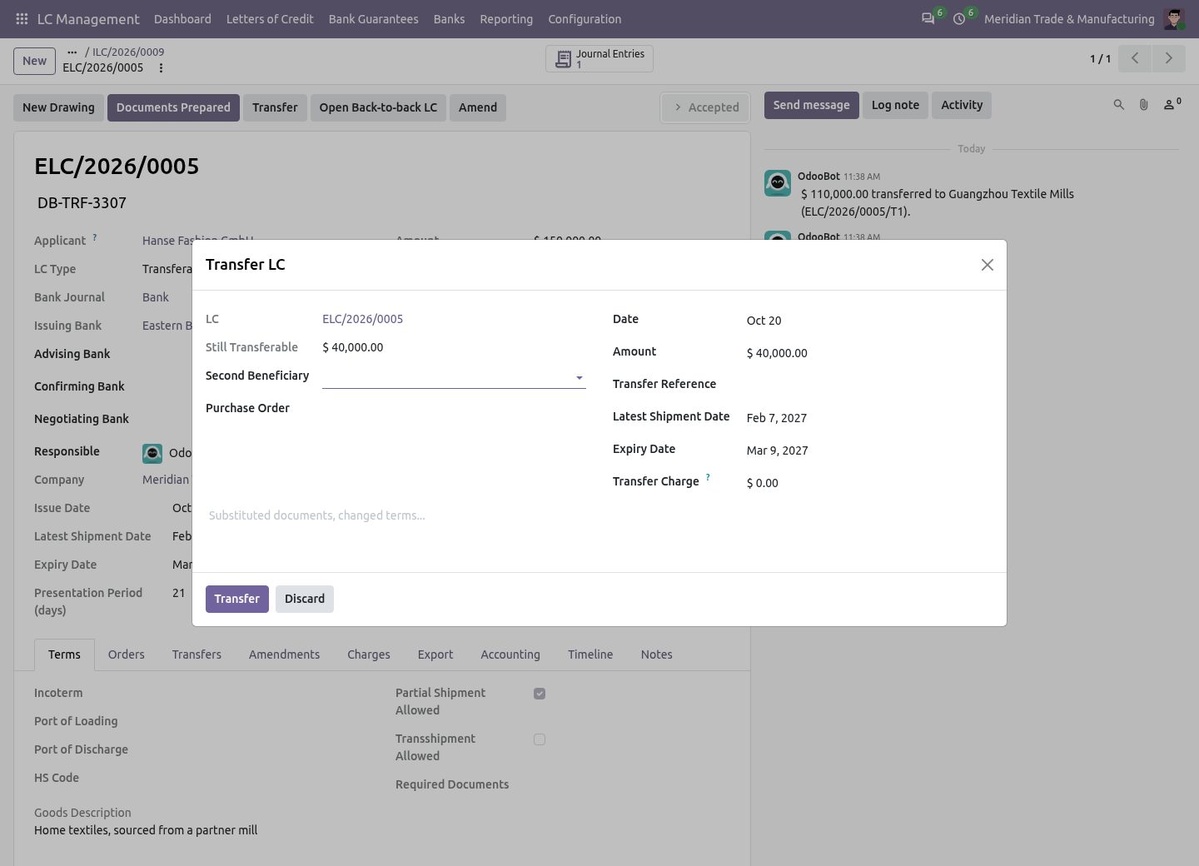
Transferable LC: second beneficiary, transferred amount and bank charge
9 |
Track issued and received bank guaranteesBank Guarantees separates guarantees your bank issues on your behalf from guarantees supplied to your company. |
Record the guarantee type, beneficiary or applicant, issuing bank, facility, amount, margin, expiry and claim-period end.
Retain purpose, tender and contract references, purchase or sale links, and whether the original was received or returned.
Extend validity with the applicable fee and commission, reduce the amount, record a partial or full claim, or release the guarantee.
Review the event history, margin movements, charges and journal entries from the guarantee record.
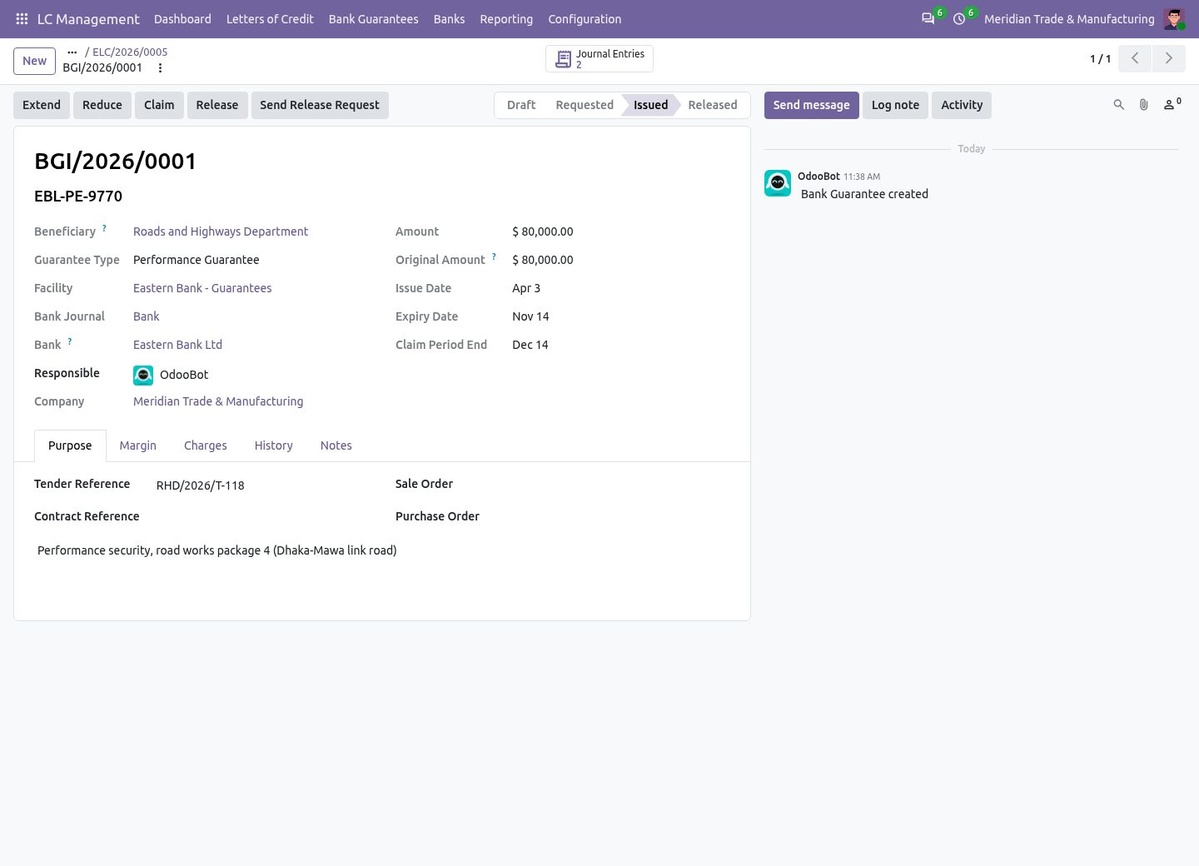
Issued bank guarantee with expiry, claim period, margin and event history
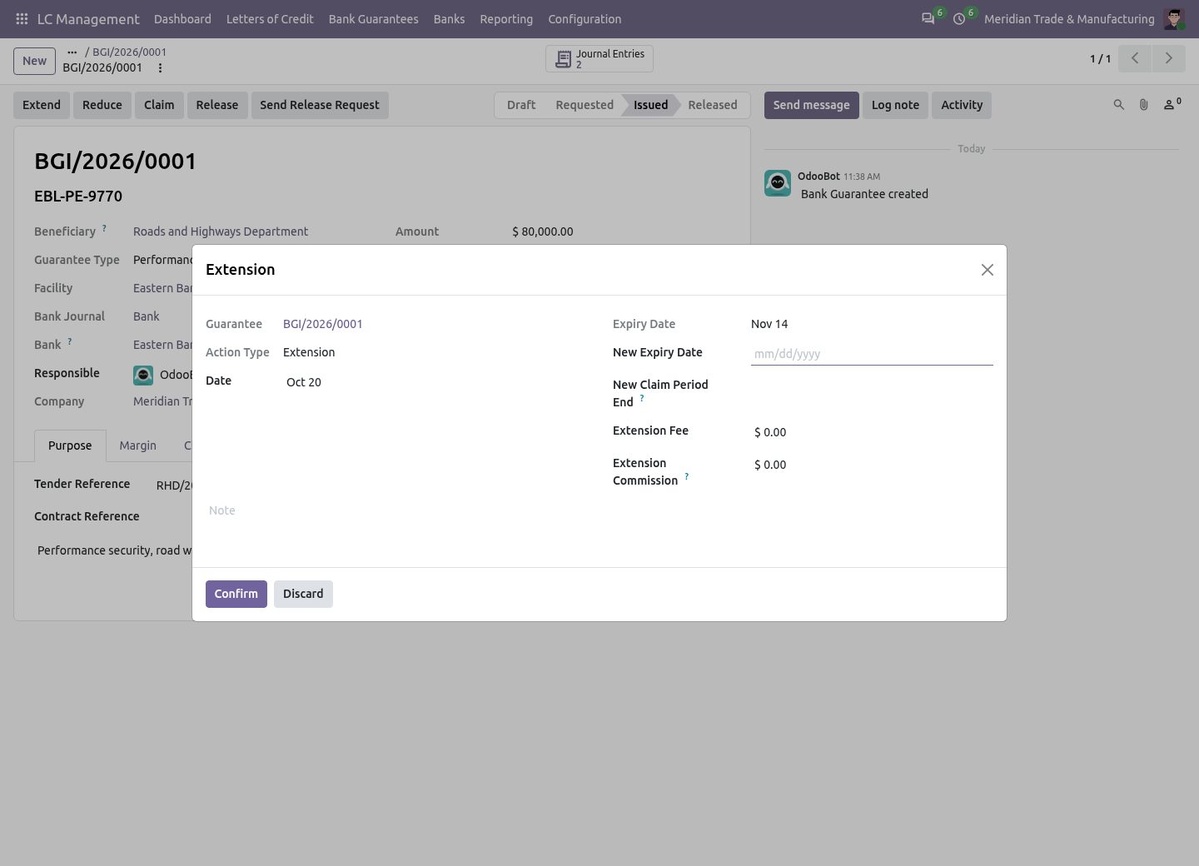
Guarantee action wizard: extension dates and related fees
10 |
Keep margins, bank charges and the ledger connectedBanks → Margin Moves and Charges provides the accounting detail behind LC and guarantee balances. |
Opening, topping up and releasing cash margin creates traceable margin movements and linked journal entries.
Post commissions and charges against their LC, amendment, shipment or guarantee. The charge type selects expense or landed-cost treatment.
Usance acceptance, maturity settlement, negotiation, realization and claims create entries through the configured accounts.
Foreign-currency bank journals retain currency amounts; configured exchange accounts handle differences where applicable.
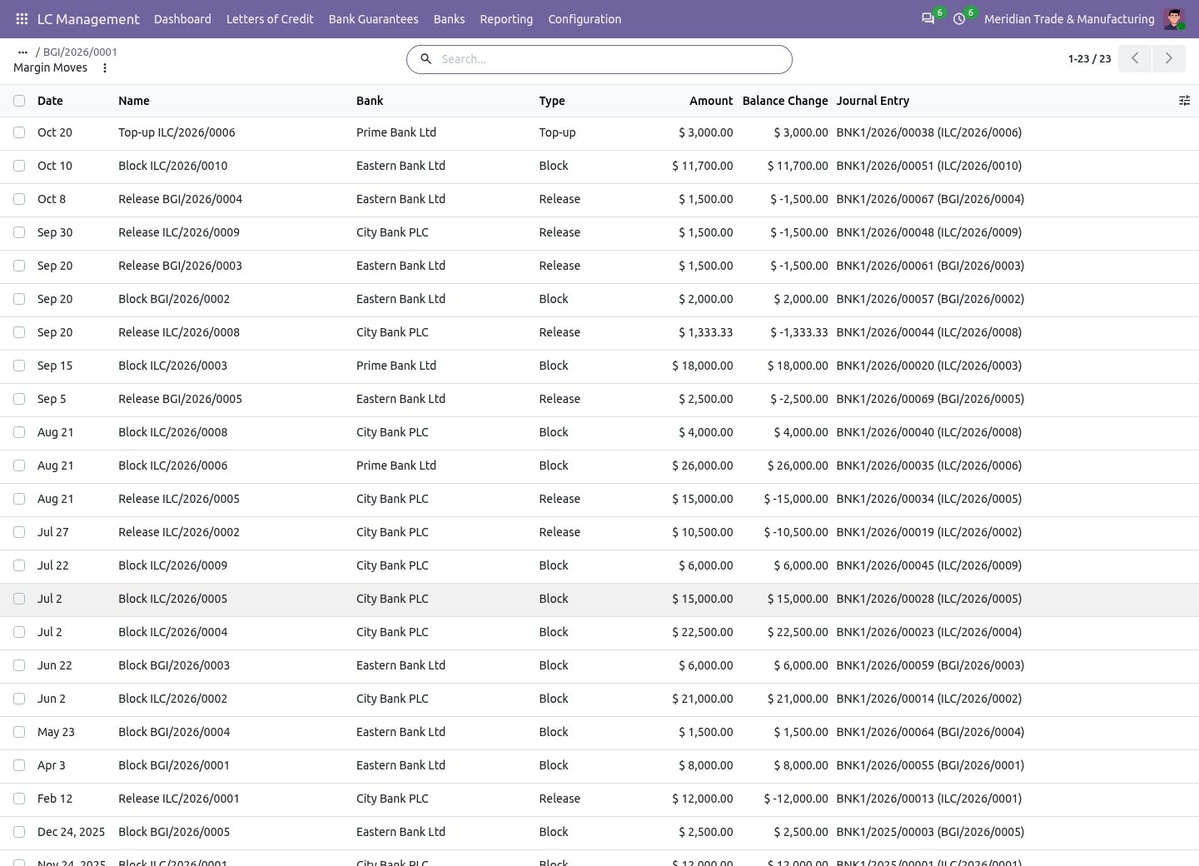
Margin movements linked to their instruments and accounting entries
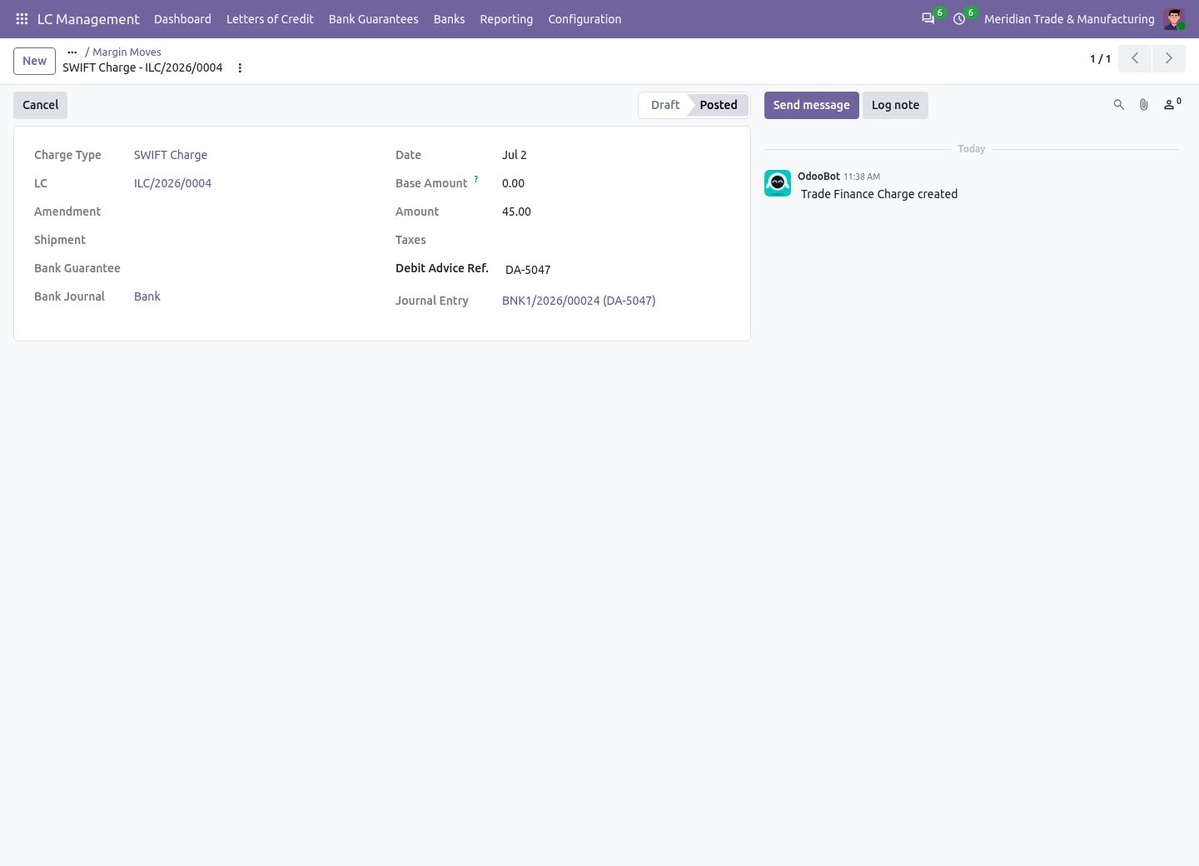
Bank charge with calculation, source instrument and posting details
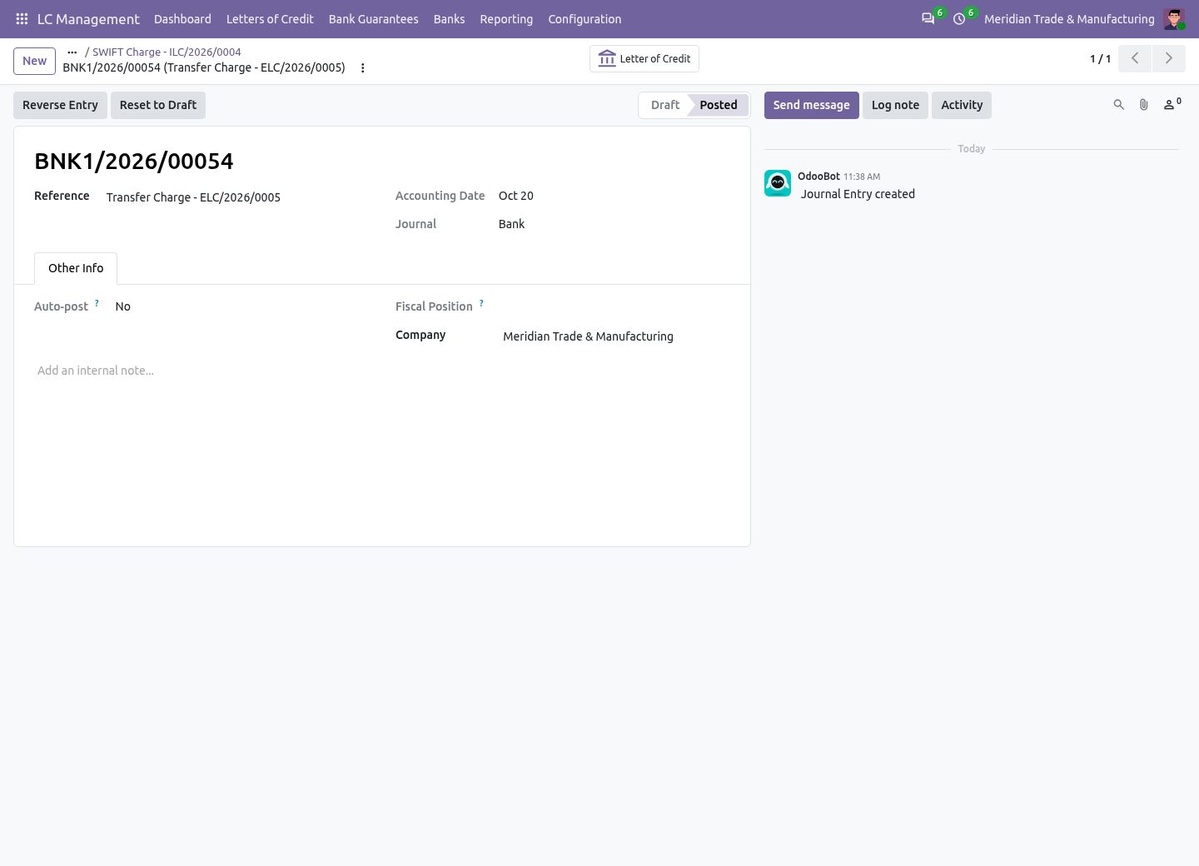
Posted trade finance journal entry with linked source record
11 |
Convert accepted obligations to LTR or PAD loansUse Convert to Loan for an accepted import shipment that is to be financed. Banks → Loans keeps the resulting loan visible after conversion. |
Choose LTR, PAD or another supported loan type, a loan facility, interest rate, start and due dates, and an instalment plan.
Track original principal, principal repaid, outstanding amount, paid interest and the next instalment due.
Record partial or full repayment with its date. Accrue interest to the current date and follow repayment and journal-entry history.
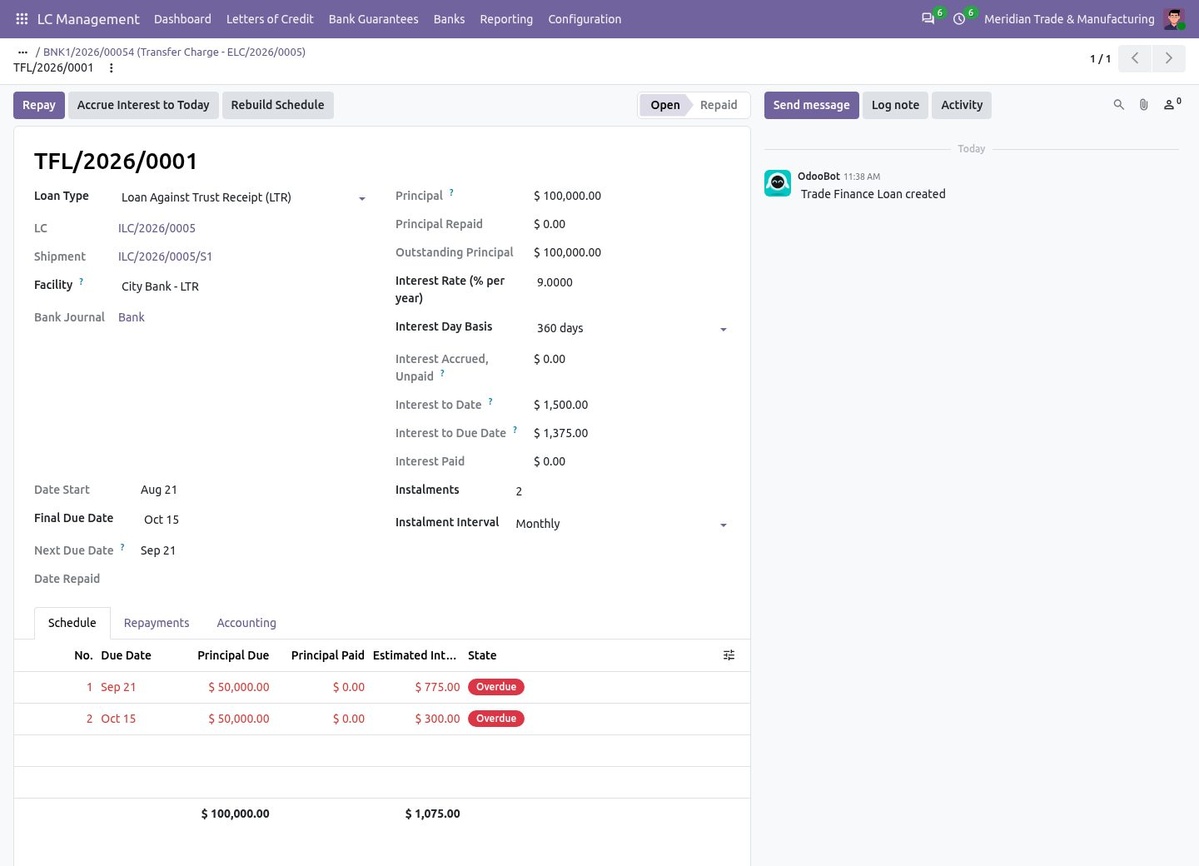
Trade finance loan: principal, outstanding amount, interest and instalments
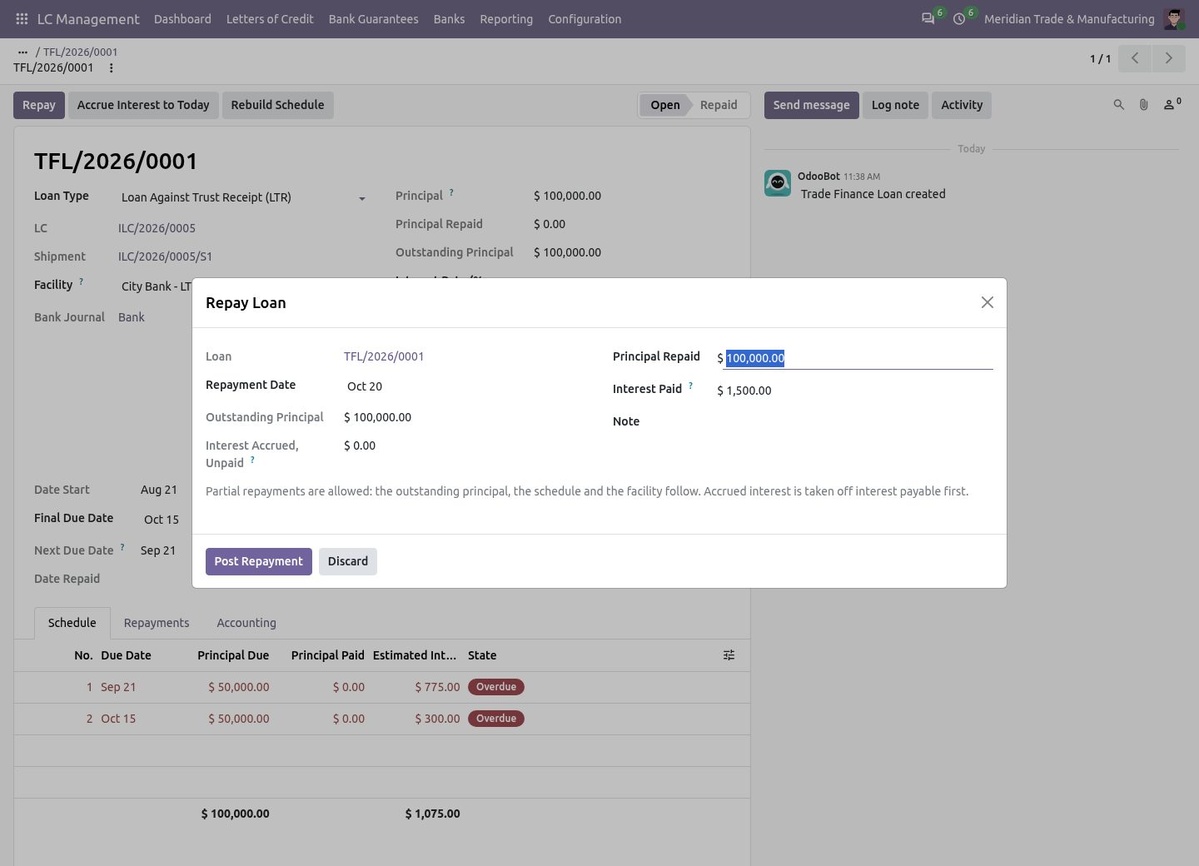
Loan repayment wizard: repayment date, principal and interest
12 |
See maturities, exposure and the LC lifecycleThe dashboard combines period figures with the current open position. Choose period, bank, facility, direction, partner, currency and responsible user. |
Use Overview, Letters of Credit, Guarantees, Banks & Margin, Charges & Loans, Alerts, Timeline and Reports; an Ask AI tab appears when a provider is configured.
Compare flow KPIs with the previous period. Open related records from KPI cards, charts, grid cells and alert rows.
Inspect maturity heatmaps, bank-to-facility exposure flows and exposure-share treemaps.
Switch supported lists to Grid for bank, facility or partner rows and date columns. The portfolio and per-LC timelines show dated items with record links.
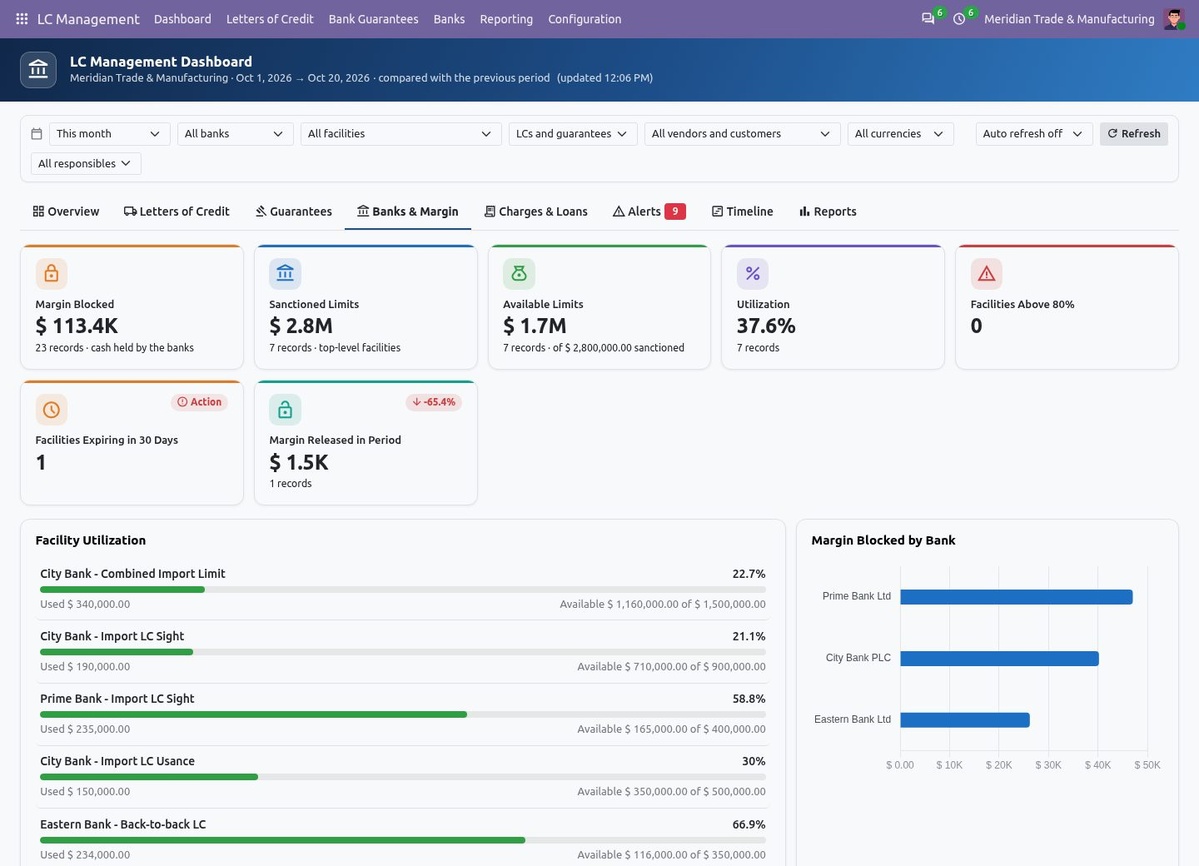
Banks & Margin dashboard: facility utilization and margin balances
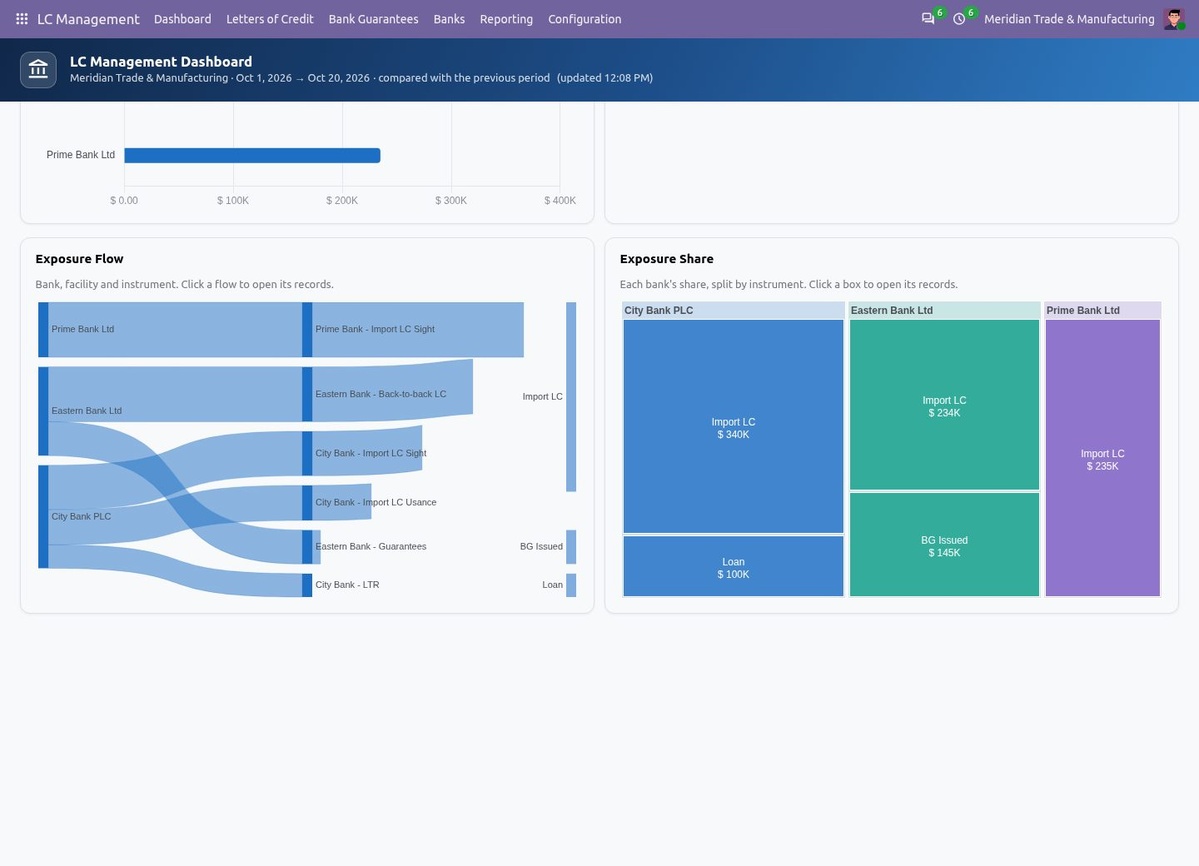
Exposure flow by bank, facility and instrument alongside the exposure-share treemap
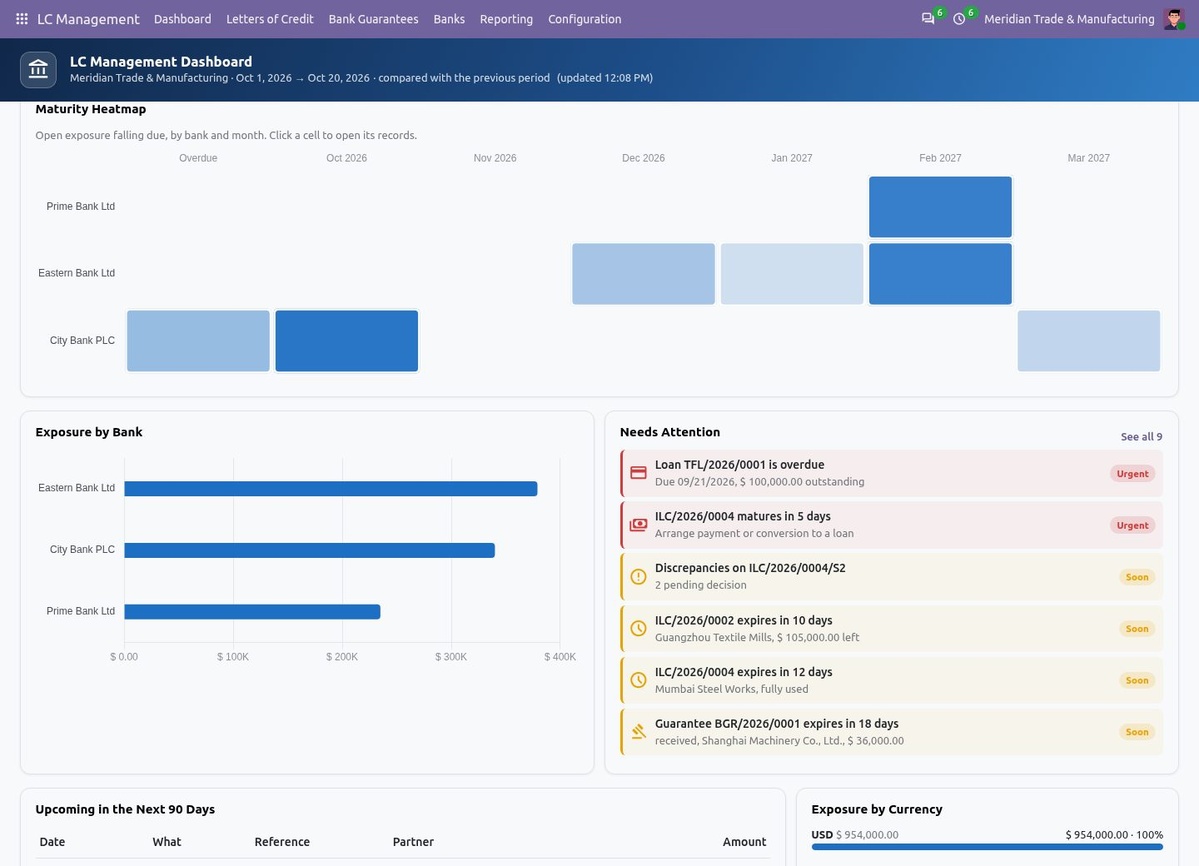
Maturity heatmap: open exposure by bank and due month
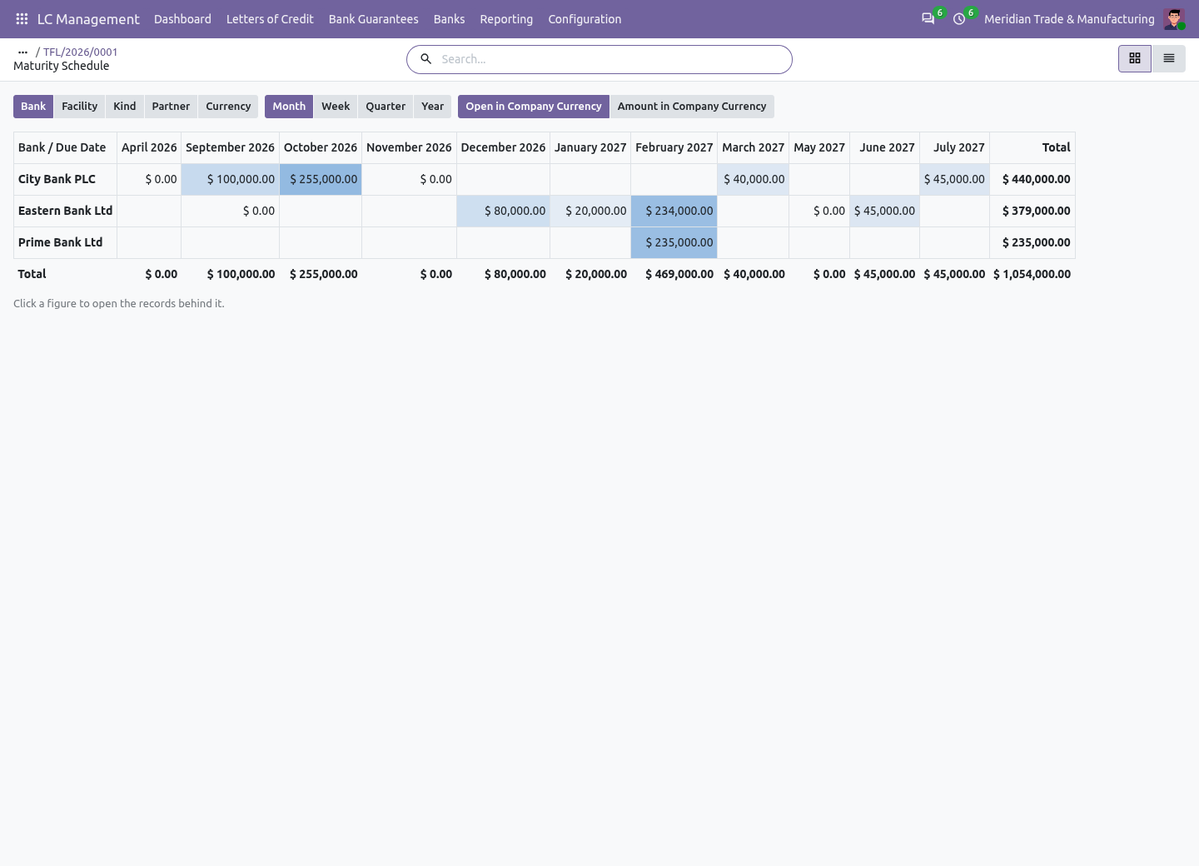
Maturity grid: grouped amounts across time with drill-down to records
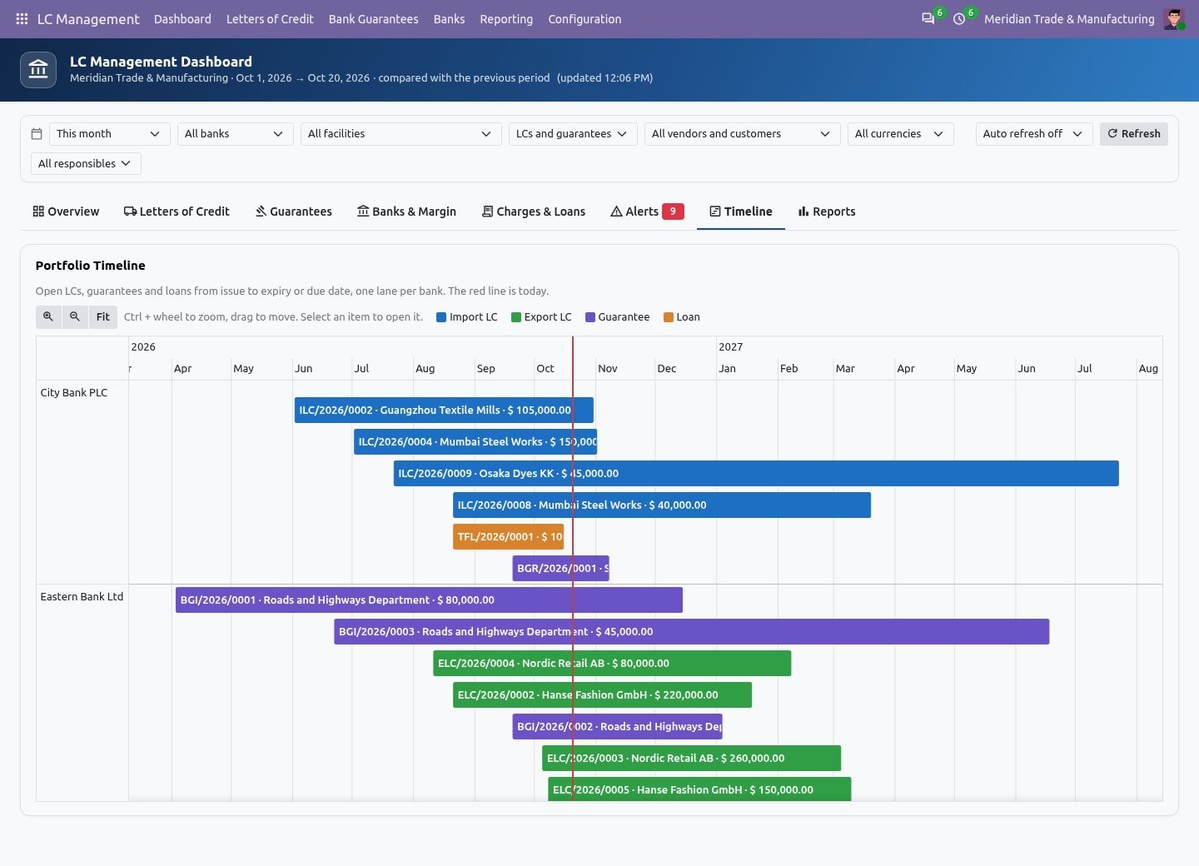
Portfolio timeline: LC and guarantee validity grouped by bank
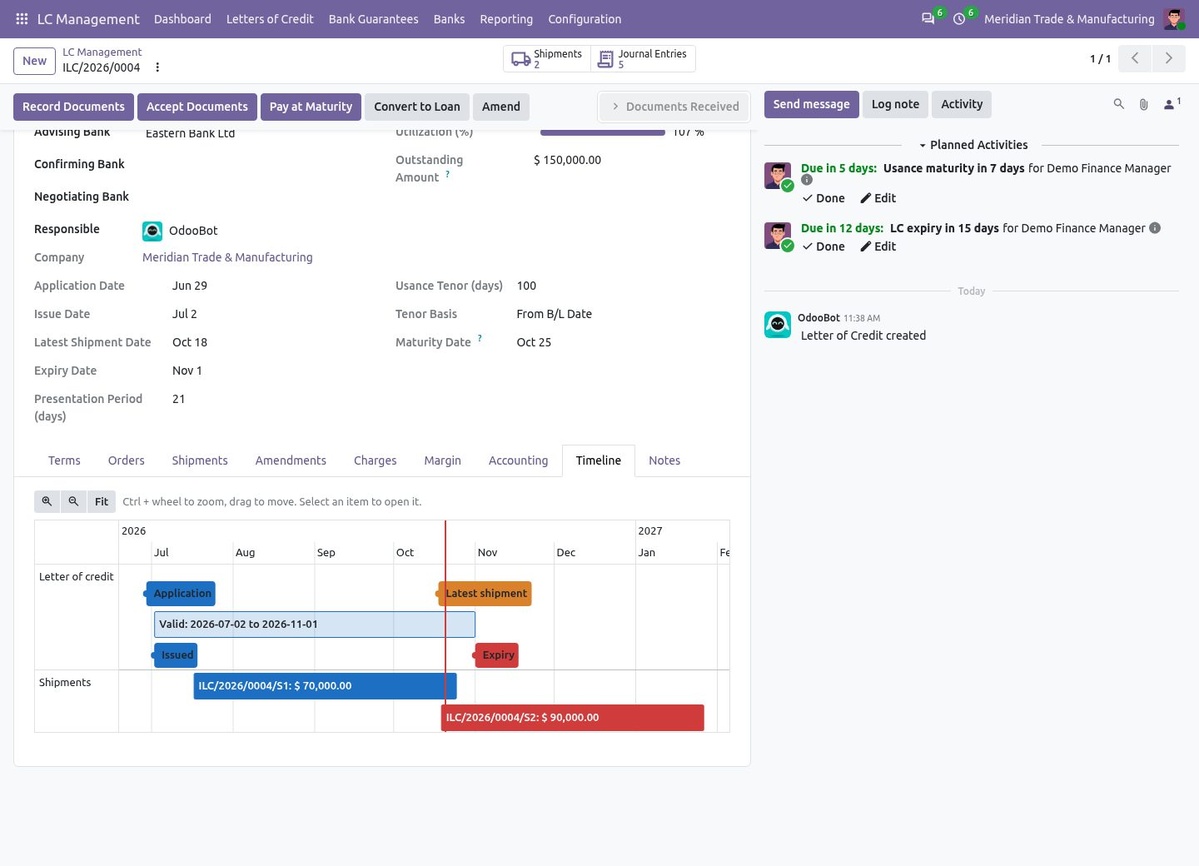
An LC's timeline: validity and shipment events on one record
13 |
Use AI assistance with a review stepAI features are optional. Select OpenAI or a compatible endpoint, Anthropic, Google Gemini or a local Ollama server in Trade Finance settings. |
Paste MT700 / MT707 text or upload a supported text-based PDF or text file. Review the proposed values, correct them, then apply them to an eligible LC.
Compare attached shipment documents with LC terms. Review the suggested discrepancies and select which ones to record.
Ask questions about trade finance records. The proposed search is checked and executed with the user's access rights before an answer is prepared.
AI responses are requested in the selected user language. Hosted providers receive the document text, LC terms, questions or matching record data needed for the requested feature; configure the provider before use.
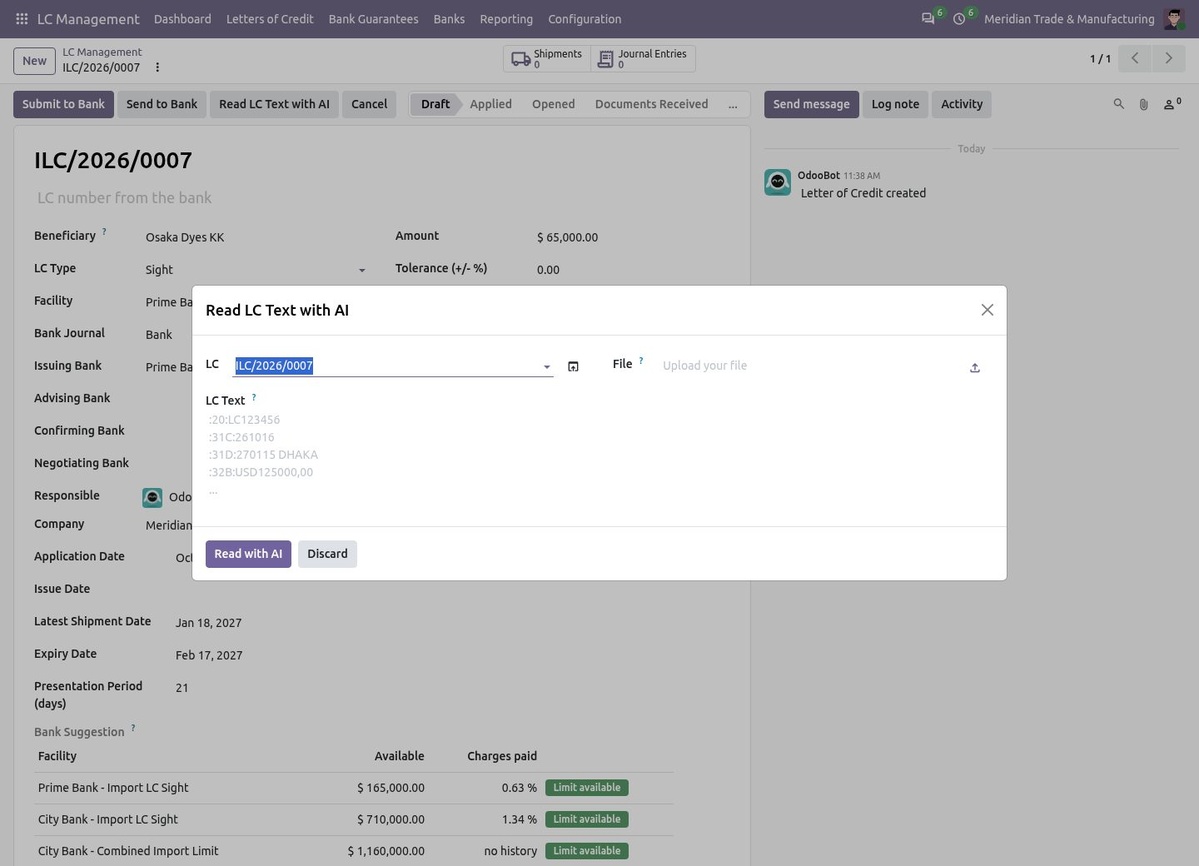
AI LC reader: paste bank text or upload a file before reviewing suggested values
16 Reports — View, PDF and Excel
Open Reporting → PDF & Excel Reports or the dashboard's Reports tab. Each report shows the filters it supports: period, bank, facility, partner, direction, open records or the maturity horizon. View on screen, print as PDF or download the same report data as XLSX.
Registers & Utilization
LC Register; BG Register; LC Utilization; Facility Utilization.
Exposure & Deadlines
Exposure by Bank; Maturity Schedule.
Charges & Margins
Charges; Margin Statement.
Shipment & Document Control
Shipments and Documents; Discrepancies; Acceptances and Payments.
Exports & Financing
Export Presentations and Realization; Loan Statement.
Changes & Guarantee Events
Amendment Register; Guarantee History and Claims; Transfers and Standby Claims.
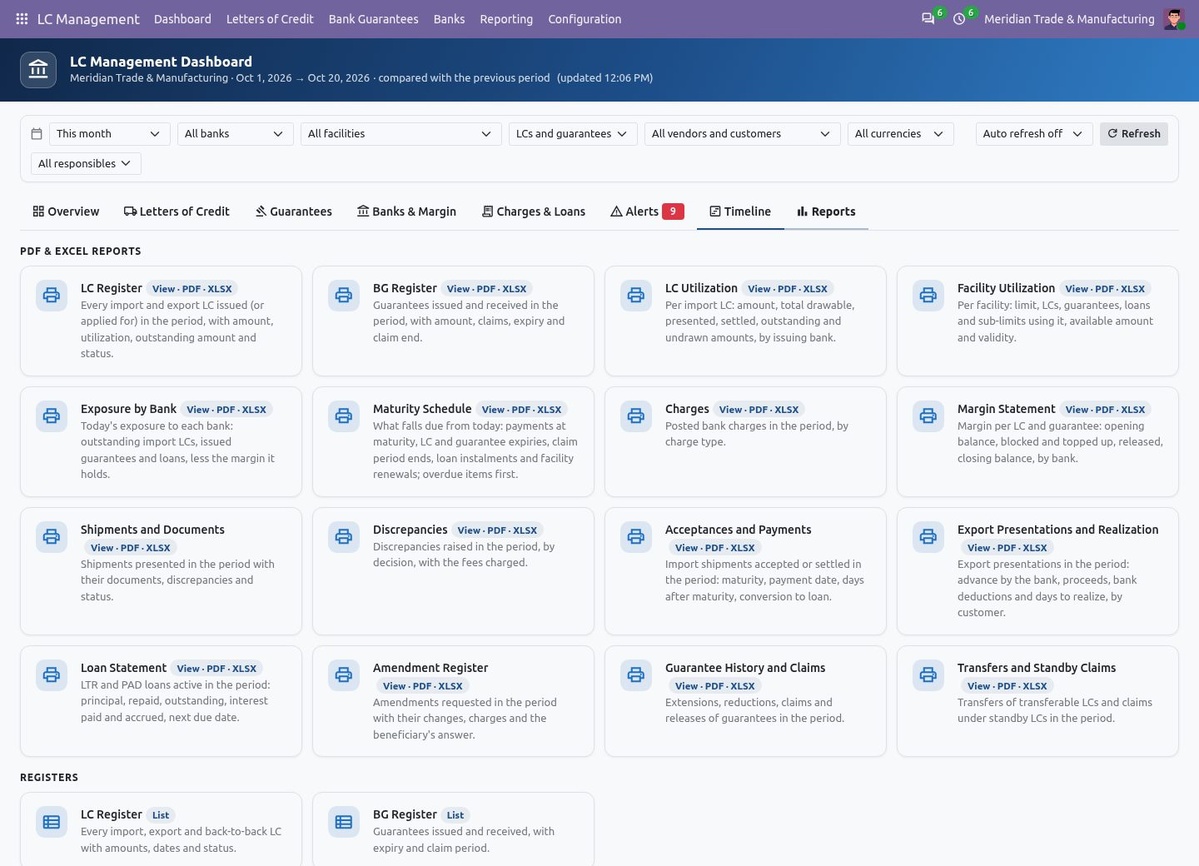
Dashboard Reports tab: the complete trade finance report selection
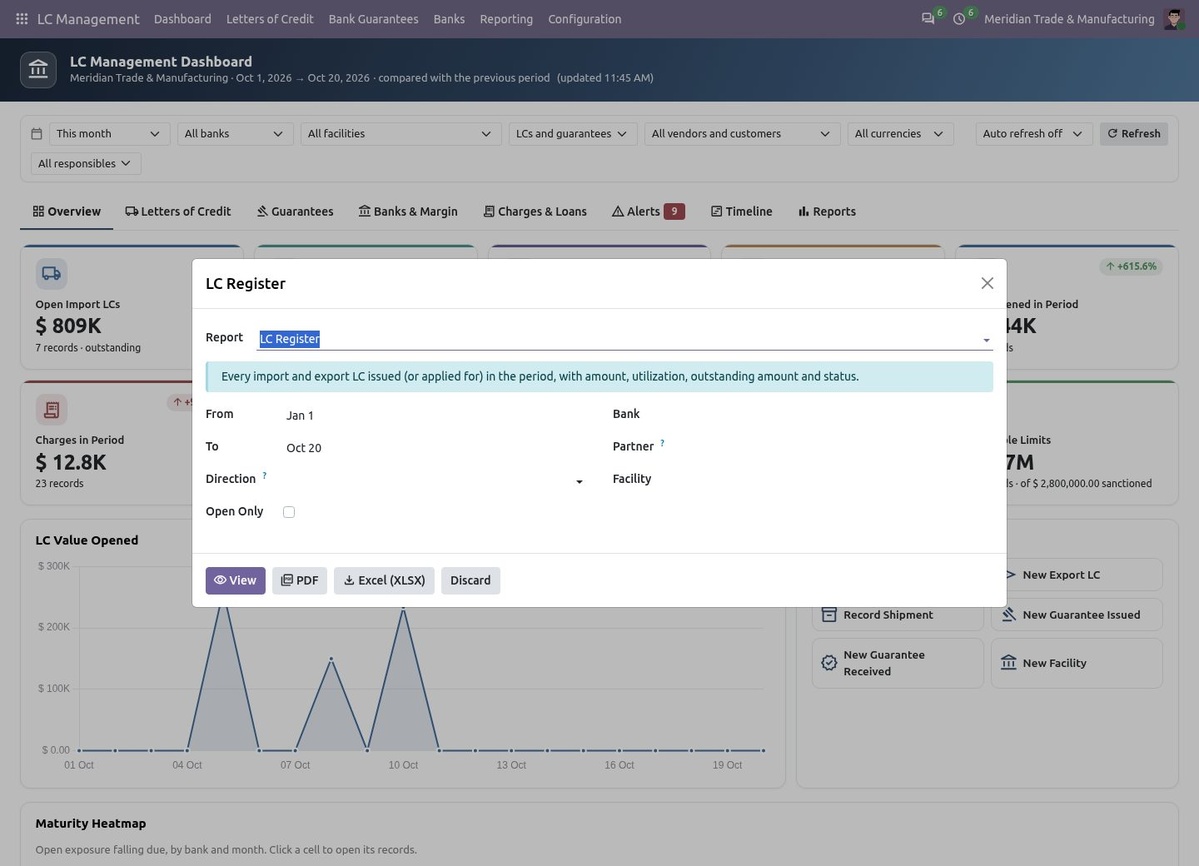
Report options: applicable filters and on-screen, PDF and XLSX outputs
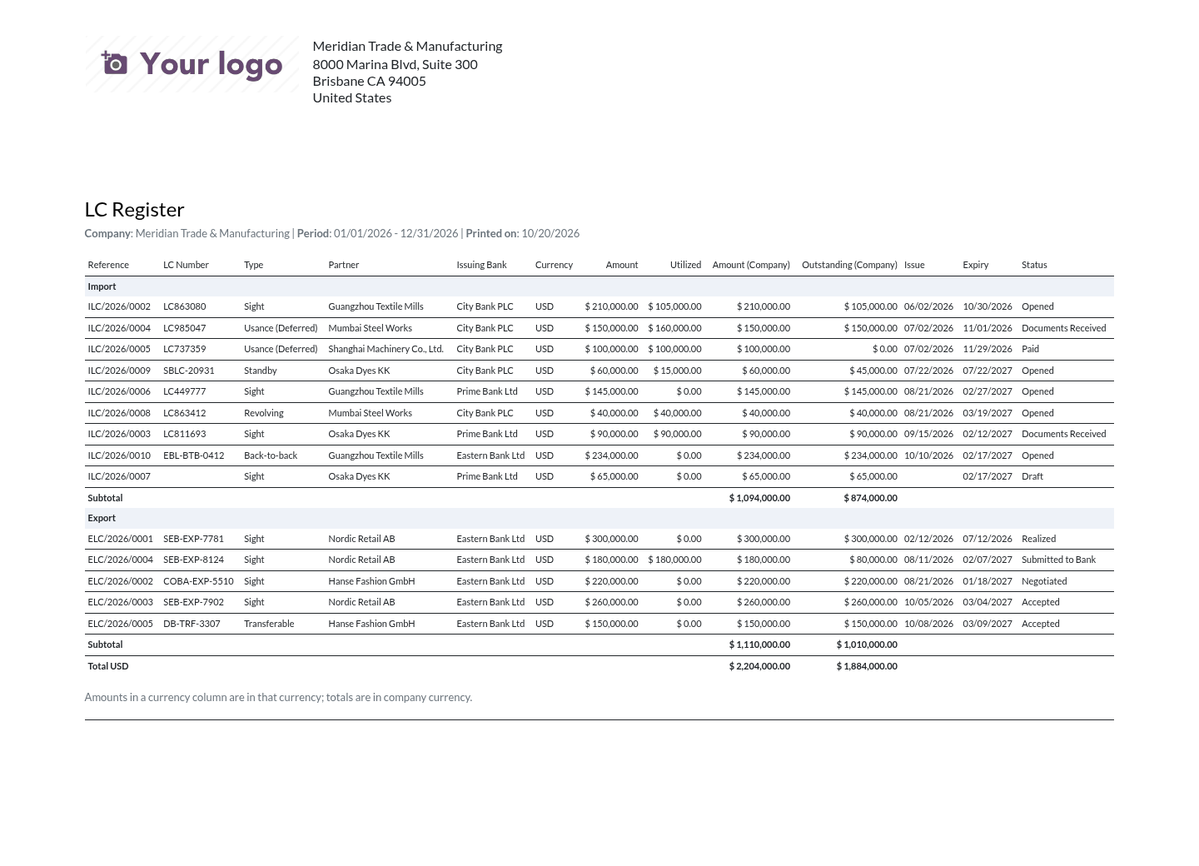
On-screen report preview with grouped rows and totals
Bank Letters and Printed Documents
Print an LC application, LC amendment request, guarantee request or release letter from the relevant record. The Send to Bank actions prepare correspondence with the corresponding PDF attachment for review before sending. LC and BG registers, a facility utilization statement and shipment cost sheets are also available from the record print actions.
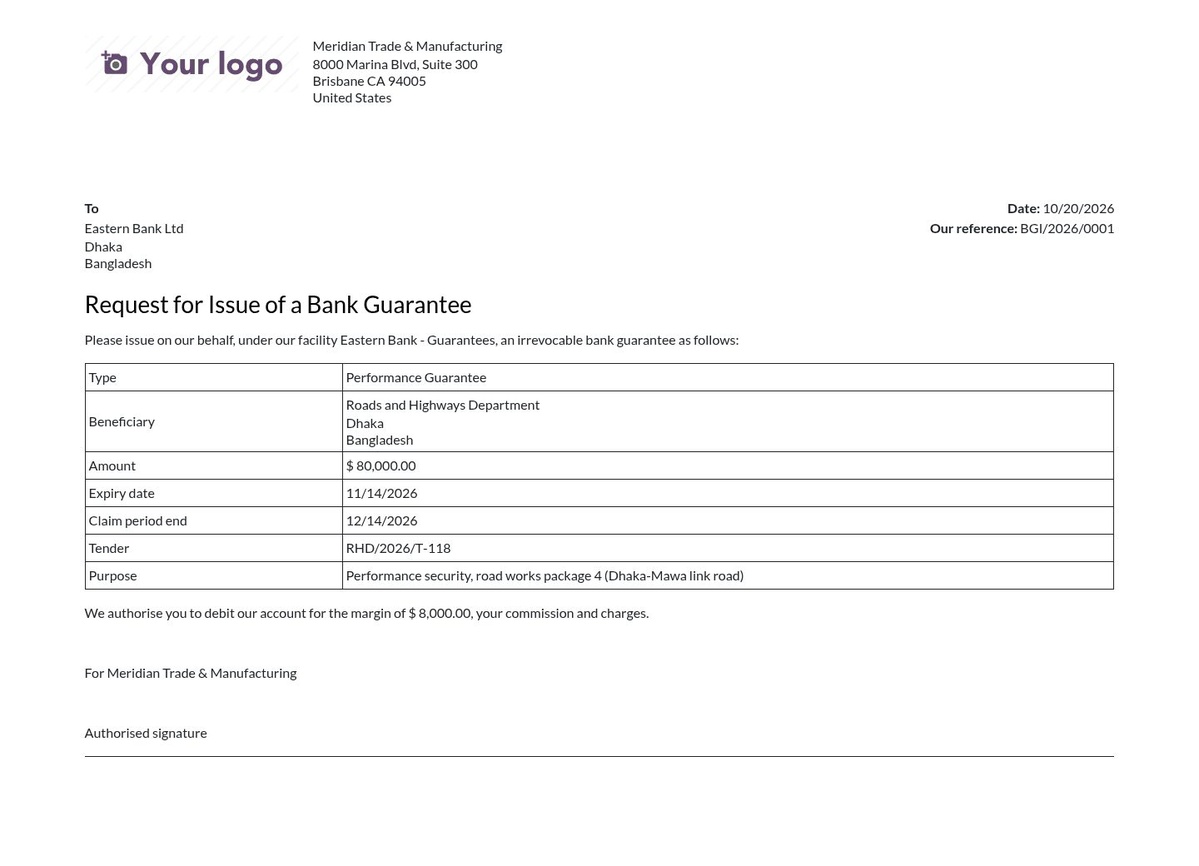
Bank guarantee request letter prepared from the instrument's details
Roles That Match the Work
| Role | What it covers |
|---|---|
| Read-only | Review letters of credit, guarantees, facilities and reports. |
| User | Create and edit operational records, prepare documents and maintain draft charges through permitted workflow actions. |
| Manager | Approve controlled actions, manage facilities and configuration, and override the facility limit policy where allowed. |
Posting trade finance entries requires both the Trade Finance Manager role and the Accounting / Invoicing role. Company-specific accounts, sequences, currencies and facility settings keep financial setup explicit.
Deadlines and Company Policy
Configure reminders before LC expiry, latest shipment, document presentation, usance maturity, guarantee expiry or claim end and facility renewal. Activities go to responsible users; optional email notifications accompany them. Facility-utilization thresholds and overdue loan instalments also feed the work queue.
Multiple Language Support
English, Bengali, Arabic, Simplified Chinese, Spanish, French and German catalogs cover screens, messages and report labels. Each user selects a language. Dates and dashboard numbers follow that locale; Arabic timelines and XLSX sheets support right-to-left display. Banking wording can be reviewed in the supplied catalogs before operational use.
Built to Fit Your Odoo
Odoo Community
Accounting, Purchase, Sales, Inventory, Landed Costs and Discuss
Accounting / Trade Finance
OPL-1
Bank references stay linked to ordinary purchase orders, sale orders, receipts, invoices and journal entries. The built-in dashboard, grids and timelines are included in this module. A "Trade Finance" spreadsheet dashboard is included in the Dashboards app.
XLSX exports use the xlsxwriter Python package. AI calls use the configured provider; Anthropic additionally needs its optional Python client. Review the company's accounts, charge rules and bank-letter wording during implementation.
Support & Developer Details
For installation, accounting setup, bank-specific documents, additional reports or implementation support, contact the maintainer.